For over a decade, I’ve been providing a way to easily access high-resolution album artwork through my iTunes Artwork Finder and Apple Music Artwork Finder. These tools allow you to uncover the original, uncompressed artwork files exactly as they were delivered to Apple by the artist or their label — no compression, no quality loss, just high quality imagery.
Over the years, I’ve received countless messages from users who loved these tools but wished for more; specifically, the ability to fetch multiple pieces of artwork at once or automate the process…
Today, I’m thrilled to announce an Apple Shortcut that lets you do just that, now available exclusively on Gumroad.
Fetching album artwork with Apple Shortcuts
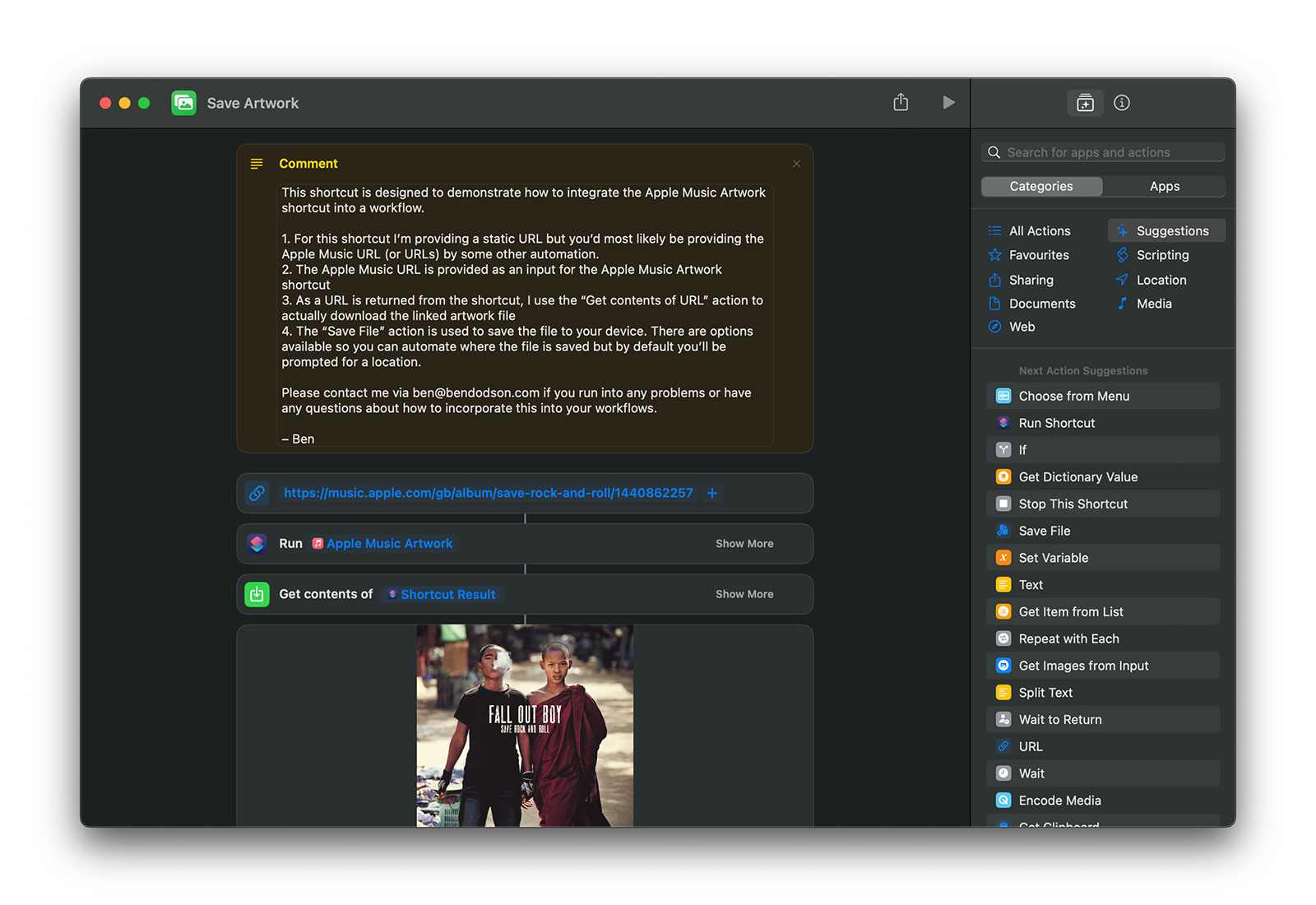
With this new shortcut, all you need is an Apple Music URL. Feed it in, and you’ll get back a direct link to the highest resolution, uncompressed artwork available. I’ve also created a demo shortcut that shows you how to use this tool as part of a larger automation. Imagine easily inputting a URL and having the artwork automatically downloaded to your device. It’s that simple.
This shortcut isn’t just limited to album artwork. It works with playlists, stations, artists, music videos, and curators too. Essentially, if it’s on Apple Music, you can get the artwork.
I’m genuinely excited to see how people will use this shortcut. If there’s enough interest, I might expand this functionality to include my other artwork finders. If that’s something you’d like to see, let me know!
Text to speech has been around on iOS for over a decade, but Apple added a few new features in iOS 17 that could make interesting additions to your app. In this tutorial I’ll show you how to use AVSpeechSynthesizer to speak with the default system voices, the new “novelty” voices, and to even speak with the users own AI generated “Personal Voice”!
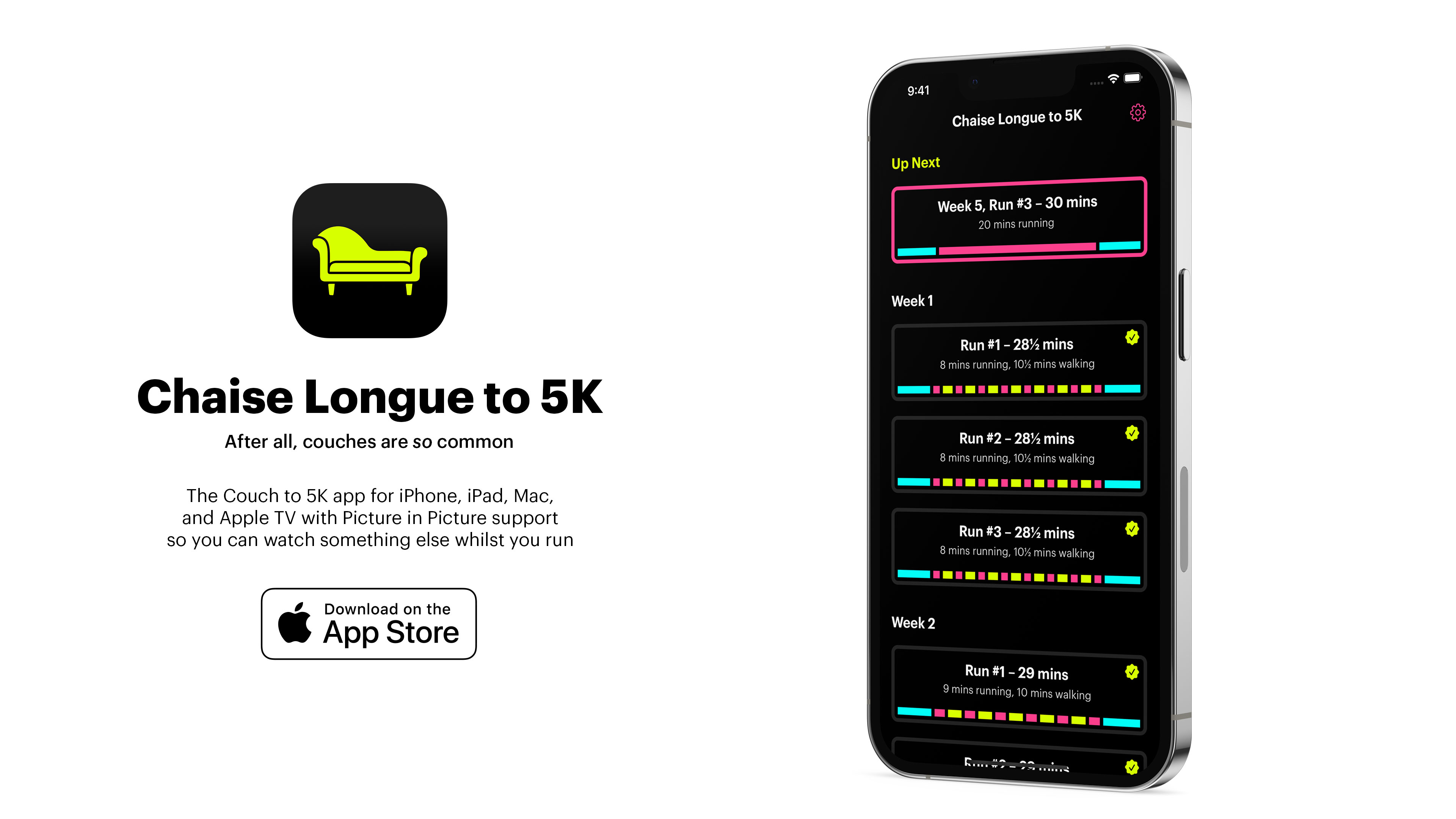
The motivation for this came about when a user of my Chaise Longue to 5K app asked me to add some sounds so they knew when to alternate between running and walking1. Whilst browsing some royalty free sfx libraries it occurred to me that there isn’t really a good way to signal “start walking” or “start running”; A single blast of a whistle for walk and a double blast for run? Instead, I decided that it might be better to use the text to speech features as then I could literally say “walk for 1 minute and 30 seconds” or “run for 3 minutes”.
The key components of this Speaker class I’ve created are the AVSpeechSynthesizer which we need to retain a reference to along with the AVSpeechSynthesizerDelegate which will allow us to change the AVAudioSession when speaking starts and finishes. In this case I’m using the .interruptSpokenAudioAndMixWithOthers category which will ensure our audio plays alongside music but will temporarily pause any spoken audio content such as podcasts or audio books.
To do the actual speaking, we just need to create an AVSpeechUtterance with our string and then pass that to the synthesizer using speak(). With that, we have a working text to audio system using the default system voice.
At our call site, it takes just a single line of code to get our device to speak:
// Singleton approachSpeaker.shared.speak("Hello, world!")// Using the object only within a specific controllerletspeaker=Speaker()// make sure this is retained[...]speaker.speak("Hello, world!")
Using System Voices
Where things get more interesting is that we can allow the user to choose a specific voice to be used. You can fetch an array of AVSpeechSynthesisVoice by calling AVSpeechSynthesisVoice.speechVoices() and then use them directly with an utterance or by looking them up by their identifier:
// if you have a reference to your AVSpeechSynthesisVoiceutterance.voice=voice// if you have only stored the identifierutterance.voice=AVSpeechSynthesisVoice(identifier:identifier)
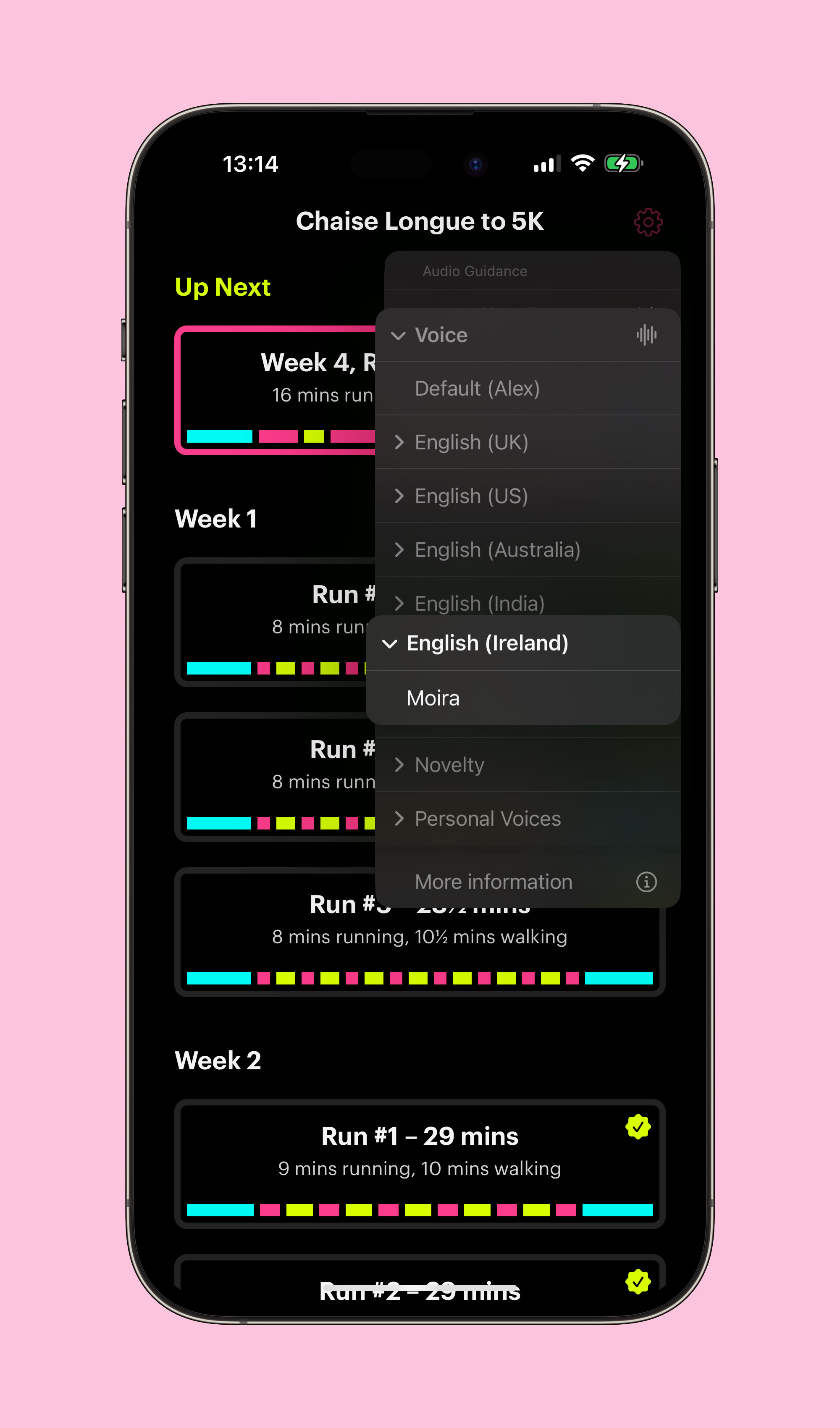
Within Chaise Longue to 5K, I list all of the English voices in a UIMenu and let the user pick one. The identifier is then stored in UserDefaults and I use this identifier whenever I want the app to speak. Should a voice ever be unavailable (more on that shortly) then using an unknown identifier will cause the system to simply use the default voice. You can also use AVSpeechSynthesisVoice.AVSpeechSynthesisVoiceIdentifierAlex to get the identifier for the default “Alex” voice.
Locales
When you fetch voices you’ll discover that there are a lot of them. In fact, there are over 150 preinstalled on iOS 17. This is because there are several default voices for most major languages. Due to this, you’ll likely want to filter out any that aren’t tuned to the language you are planning to speak or to the user’s own language. Apple provide a AVSpeechSynthesisVoice.currentLanguageCode() method to get the current BCP 47 code of the user’s locale as this differs to the identifier you may usually fetch via Locale.current.identifier2.
// getting only the voices available in the user's current localeletvoices=AVSpeechSynthesisVoice.speechVoices().filter({$0.language==AVSpeechSynthesisVoice.currentLanguageCode()})
Enhanced and Premium Voices
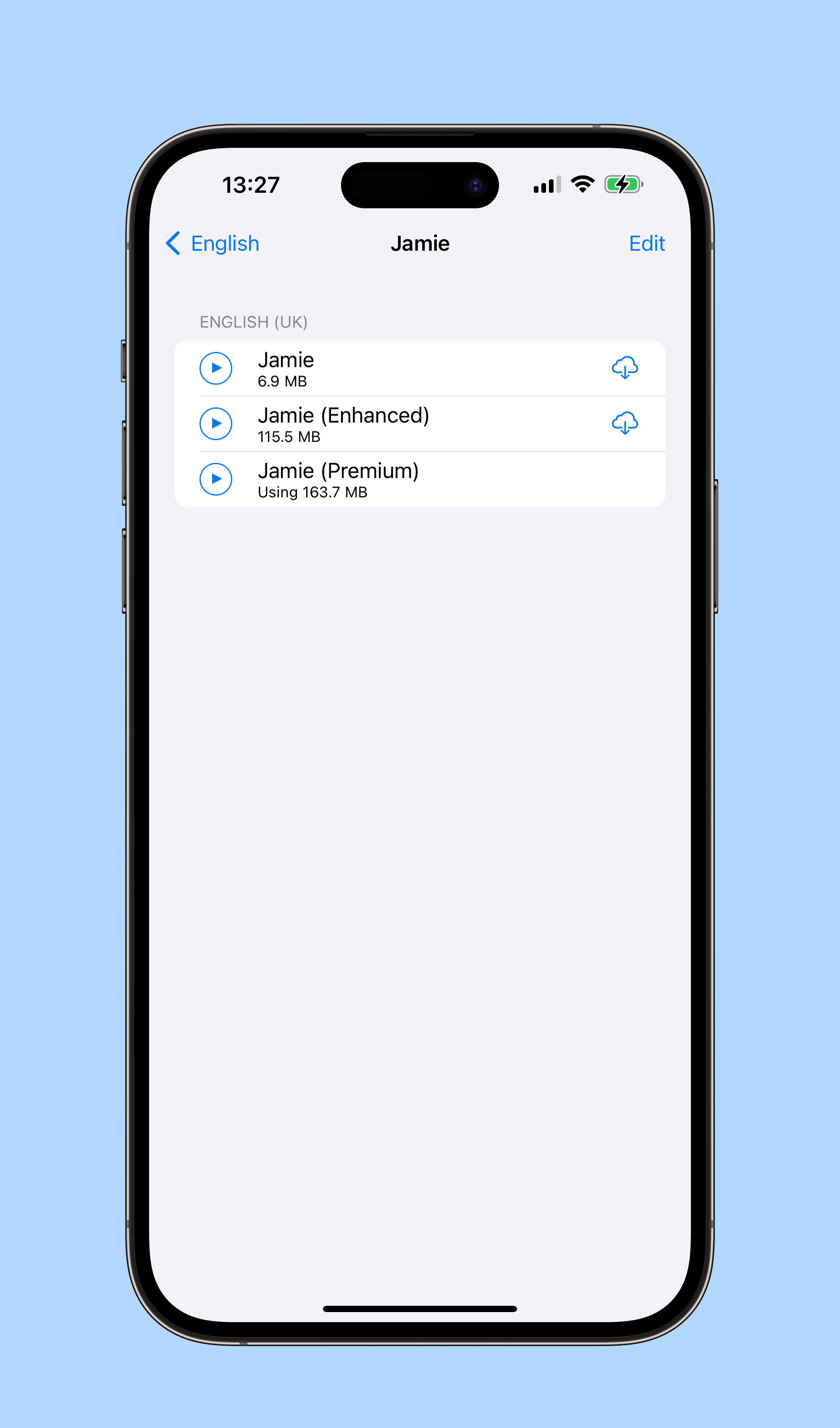
With our voices filtered by locale, the next item of interest is the quality parameter which tells us whether our voice is default, enhanced, or premium. All of the preinstalled voices are default and it shows 😂. iOS 16 added the enhanced and premium voices but you have to manually download them as they are each over 100MB. To do this, you need to go to Accessibility > Live Speech > Voices3 within the Settings app. Here you can browse all of the voices and download any additional ones you may want. Once they are downloaded, you’ll be able to use them within your own app.
// only enhanced voicesletvoices=AVSpeechSynthesisVoice.speechVoices().filter({$0.quality==.enhanced})// only premium voicesletvoices=AVSpeechSynthesisVoice.speechVoices().filter({$0.quality==.premium})
As these downloaded voices can be deleted by the user, it’s worth checking that the voice still exists if you’re letting a user choose a specific voice in your app (although, as mentioned earlier, it will fall back to the default voice if you provide a now invalid identifier).
Novelty Voices
In iOS 17, Apple added a number of novelty voices to the system. These range from cellos that speak to the cadence of Edvard Grieg’s “In the Hall of the Mountain King”4 or alien voices in the form of Trinoids. There’s also a really creepy clown that just laughs as it talks. I don’t know why anybody would actually want to use these but if you do it’s as simple as filtering by the isNoveltyVoice trait:
// only novelty voicesletvoices=AVSpeechSynthesisVoice.speechVoices().filter({$0.voiceTraits==.isNoveltyVoice})// only non-novelty voicesletvoices=AVSpeechSynthesisVoice.speechVoices().filter({$0.voiceTraits!=.isNoveltyVoice})
These are only available in en-US but it may be worth specifying this in case they get ported to other languages in a future update. Depending on your app, you may also want to filter out these voices from your UI.
Personal Voice
Personal Voice was announced in May 2023 in advance of it’s debut in iOS 17:
For users at risk of losing their ability to speak — such as those with a recent diagnosis of ALS (amyotrophic lateral sclerosis) or other conditions that can progressively impact speaking ability — Personal Voice is a simple and secure way to create a voice that sounds like them.
Users can create a Personal Voice by reading along with a randomized set of text prompts to record 15 minutes of audio on iPhone or iPad. This speech accessibility feature uses on-device machine learning to keep users’ information private and secure, and integrates seamlessly with Live Speech so users can speak with their Personal Voice when connecting with loved ones.
Essentially, Personal Voice is using on-device AI to create a private recreation of your voice. What I hadn’t realised at the time is that apps are able to use these user-created voices if the user allows it. What better motivation for my running app than having you speak to yourself!
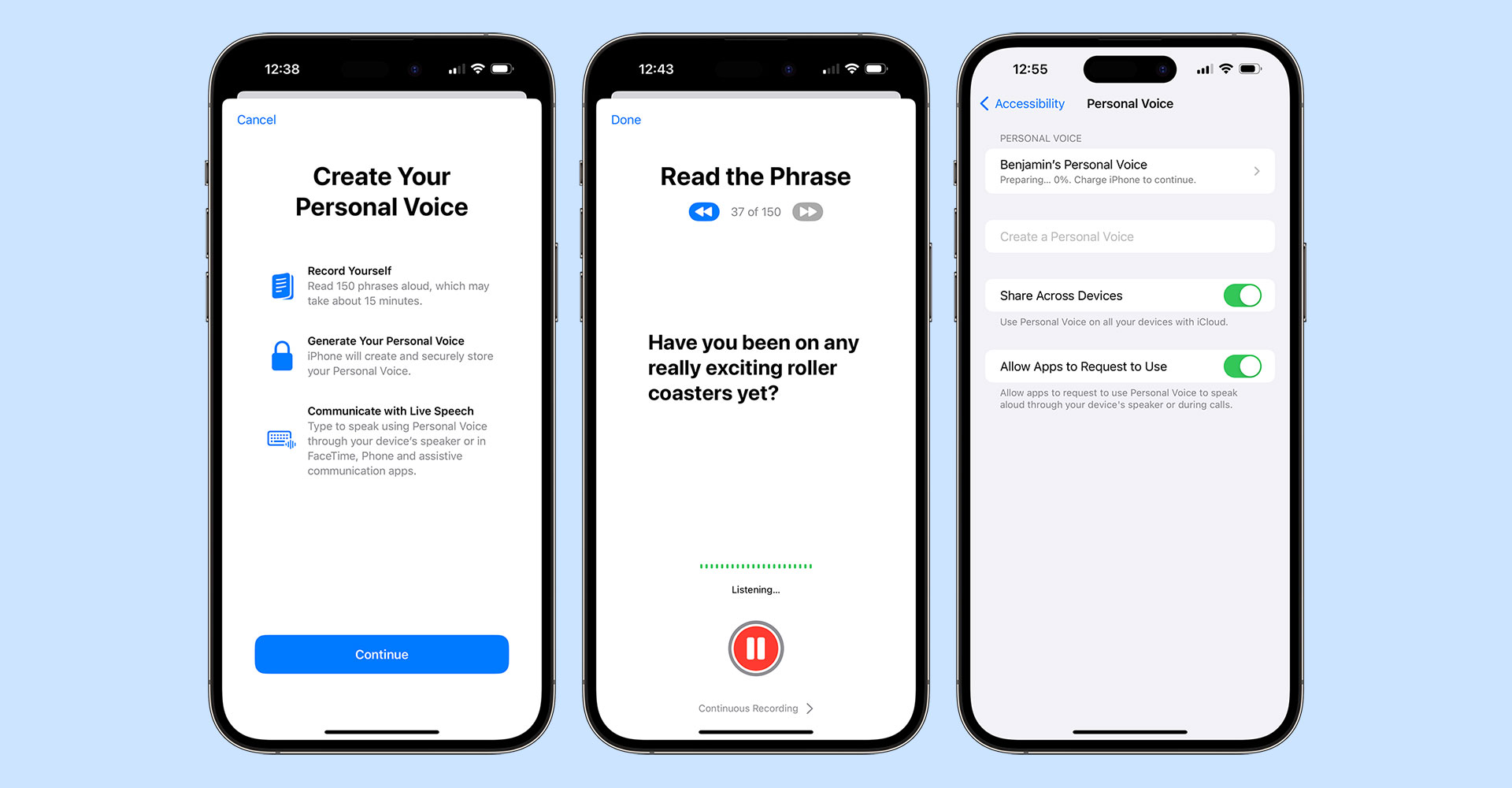
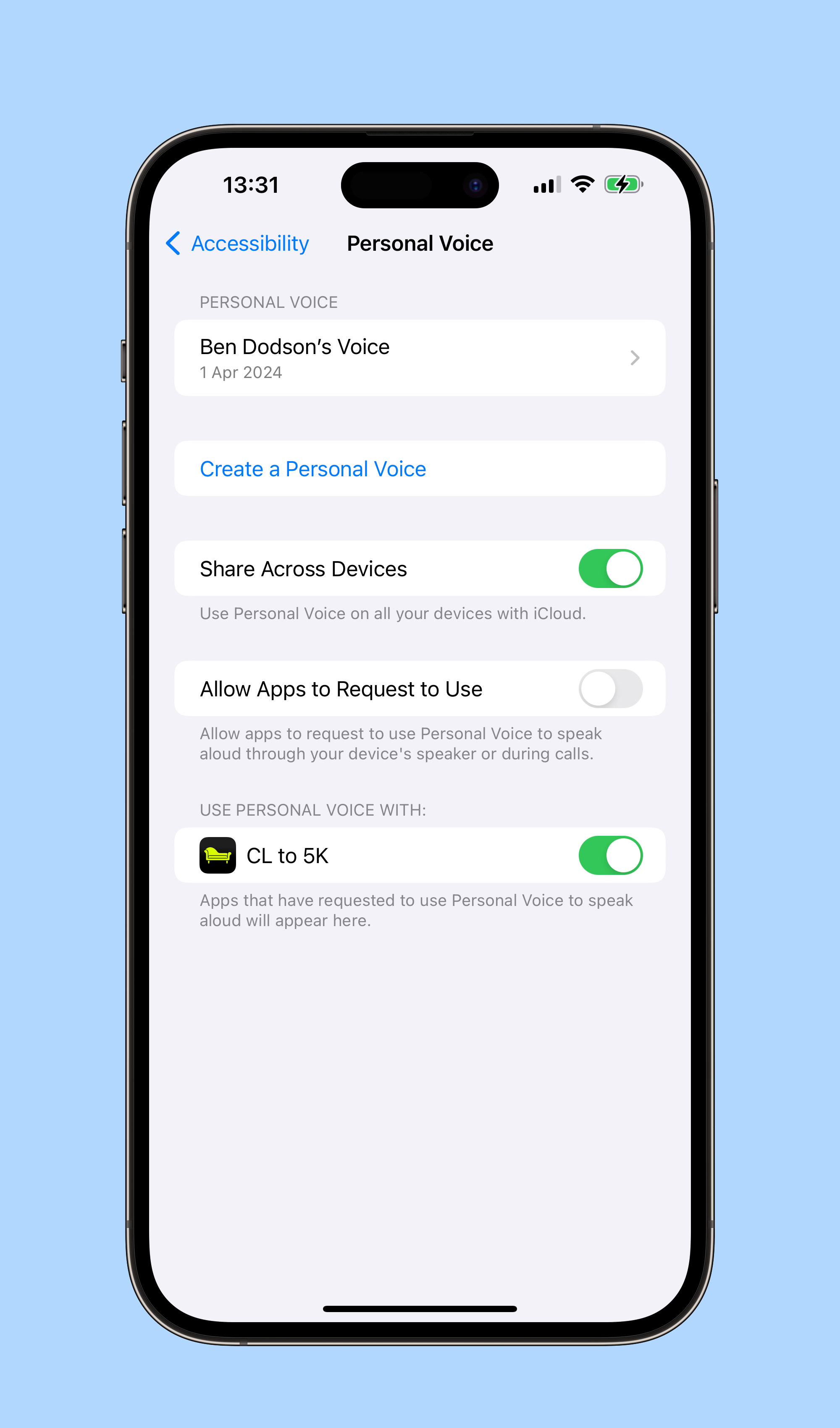
To create a Personal Voice, you need to go to Settings > Accessibility > Personal Voice and then choose “Create a Personal Voice”. You’ll read out 150 text prompts (which takes around 15 minutes) at which point you’ll need to leave your device connected to power and in standby mode so it can do the necessary algorithm crunching to generate your soundalike. In my experience, this took around 3 hours on an iPhone 15 Pro Max.
Setting up Personal Voice on iOS 17
Once completed, there is a crucial button you’ll need to enable if you want your voice to be available to other apps; the aptly named “Allow Apps to Request to Use”. This does not magically make your voice available to be used in other apps but allows apps to request the permission, otherwise any request is automatically denied. You can also choose for your voices to be synced across your devices although this currently only extends to iPhone, iPad, and Mac and as yet I’ve not managed to get it working correctly.
Now we have our voice, let’s look at how we can access it within an app:
// request permissionAVSpeechSynthesizer.requestPersonalVoiceAuthorization{statusin// check `status` to see if you're authorized and then refetch your voices}
As soon as the authorization is granted, personal voices will appear within AVSpeechSynthesisVoice.speechVoices() with the isPersonalVoice trait. This means you can filter voices to just Personal Voices very easily:
// fetch only personal voicesletvoices=AVSpeechSynthesisVoice.speechVoices().filter({$0.voiceTraits==.isPersonalVoice})
The user can choose to remove authorization for your app at any point in the Personal Voice settings panel either by turning off the toggle for your app or by disabling the “Allow Apps to Request to Use” toggle. This is slightly confusing as if you disable requests your app may still be toggled on making it seem like it would work. Your app settings also do not contain any mention of Personal Voice, even when enabled, so you can’t link to UIApplication.openSettingsURLString to get the user to view these settings.
To further confuse things, Personal Voice only works on iPhone, iPad, and Mac and only on newer models. There is an .unsupported value for PersonalVoiceAuthorizationStatus but this is only used when running on the Simulator or using an unsupported platform such as tvOS, watchOS, or visionOS; it is not called when trying to run on an older device in a supported platform (i.e. a 2nd Gen 11” iPad Pro) with .denied being sent back instead. Do bear this in mind when crafting any alert text you may display to users when they are trying to authorize your app!
I hope you enjoyed this tutorial. I’ll leave it to my Personal Voice5 to sign off…
The app was designed for Picture-in-Picture mode on an Apple TV so you could see when to run / walk whilst using other apps. I ported it to iPhone, iPad, and Mac with the same feature set but hadn’t added any sounds for those that want to run with their device in standby mode. ↩︎
Locale will give you something like en_GB whereas the BCP 47 code is en-GB. iOS 17 did add a Locale.IndentifierType so you can call Locale.current.identifier(.bcp47) but this will match AVSpeechSynthesisVoice.currentLanguageCode() which has been around since iOS 7. ↩︎
This is the same on macOS but on tvOS the only way to download extra voices is in Accessibility > VoiceOver > Voice ↩︎
Here’s a transcript in case you can’t listen to audio right now: “Hi, I’m Ben’s personal Voice. I hope you enjoyed this tutorial and have seen how easy it is to incorporate system voices, novelty voices, and even personal voices like this one into your apps. Personal voice will be available in an update for Chaise Longue to 5K very soon and I’m looking forward to seeing how you use them in your own apps in the future!” ↩︎
When TipKit was first mentioned during the WWDC 2023 State of the Union, I assumed it was going to be a way for apps to appear within the Tips app and maybe appear within Spotlight. Instead, it’s a built-in component for adding small tutorial views to your own app across all platforms complete with a rules system for condition-based display and syncing across multiple devices via iCloud! Even better, it’s something Apple are using themselves throughout iOS 17 such as in the Messages and Photos apps.
Having built a fair few popover onboarding systems in the past, this was quickly my most anticipated feature from WWDC 2023. I was slightly disappointed then when Xcode beta after Xcode beta was missing the TipKit framework. Fortunately, Xcode 15 beta 5 (released last night) now includes the relevant framework and documentation allowing me to integrate tips into my own apps.
Before I demonstrate how TipKit works and how you can incorporate it into your own apps, here is a really key piece of advice from Ellie Gattozzi in the “Make features discoverable with TipKit” talk from WWDC 2023:
Useful tips have direct action phrases as titles that say what the feature is and messages with easy to remember benefit info or instructions so users know why they’d want to use the feature and are later able to accomplish the task on their own.
With that said, let’s create our first tip!
Note: I’ve included code for both SwiftUI and UIKit below but Apple also provided a way to display tips in AppKit. It should be noted that the UIKit versions are not available on watchOS or tvOS. It’s also worth noting that there are a few bugs in the TipKit framework in beta 5, particularly around actions which I’ve documented below.
1. Creating a Tip
First we need to initiate the Tips system when our app launches using Tips.configure()1:
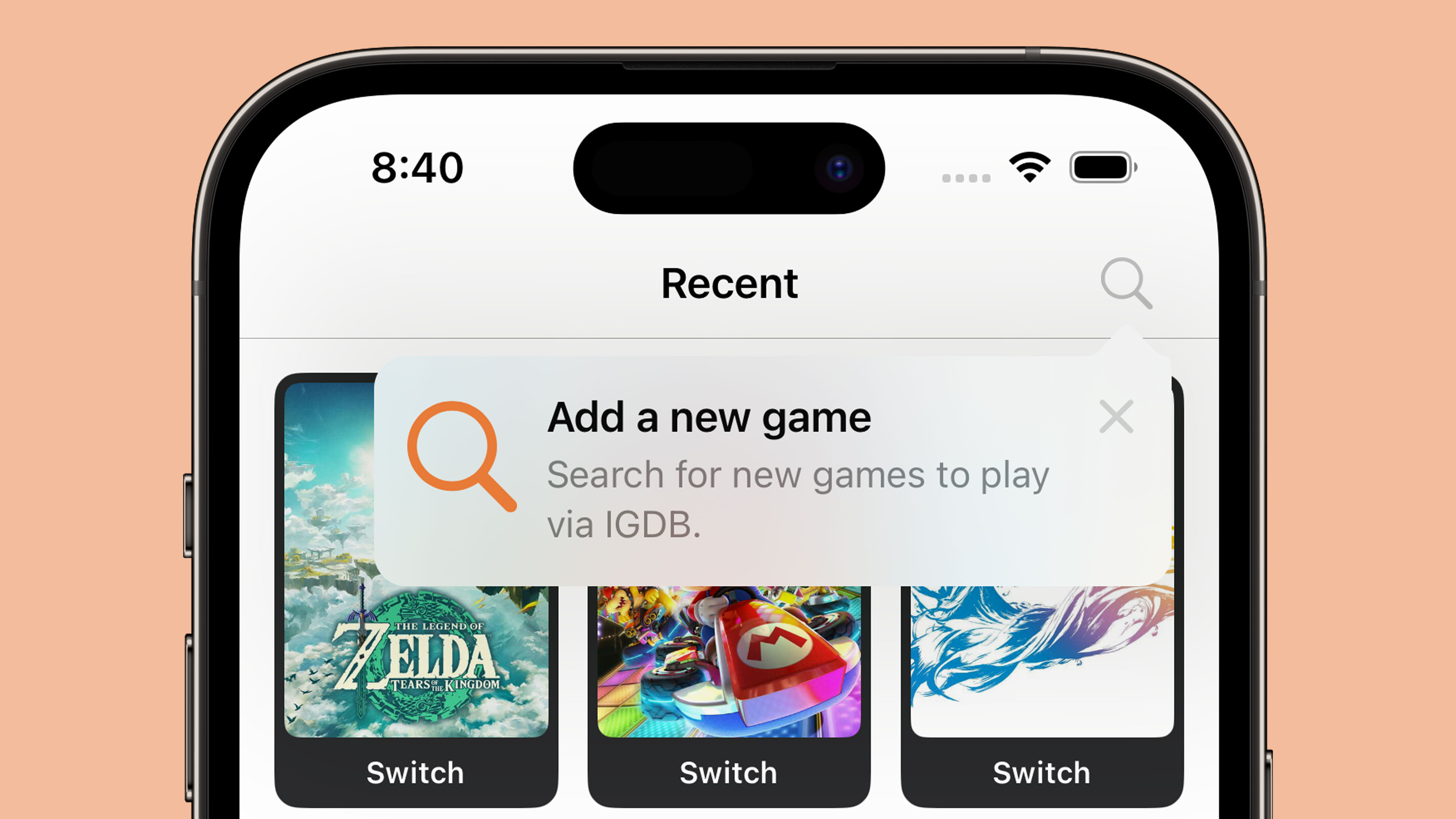
structSearchTip:Tip{vartitle:Text{Text("Add a new game")}varmessage:Text?{Text("Search for new games to play via IGDB.")}varasset:Image?{Image(systemName:"magnifyingglass")}}
UIKit also has a TipUICollectionViewCell for displaying tips within a collection view which should be the route used for table-based interfaces as well. The SwiftUI code is definitely less verbose 🤣
2. Making your tips look tip-top 🎩
You can customise your tips with changes to text colour and fonts along with background colour, corner radius, and icons. The tip views are also fully compatible with dark mode.
Fonts and text colour
These are customised within the Tip structs themselves as you are returning instances of SwiftUI.Text even if you are ultimately rendering your tip in UIKit or AppKit.
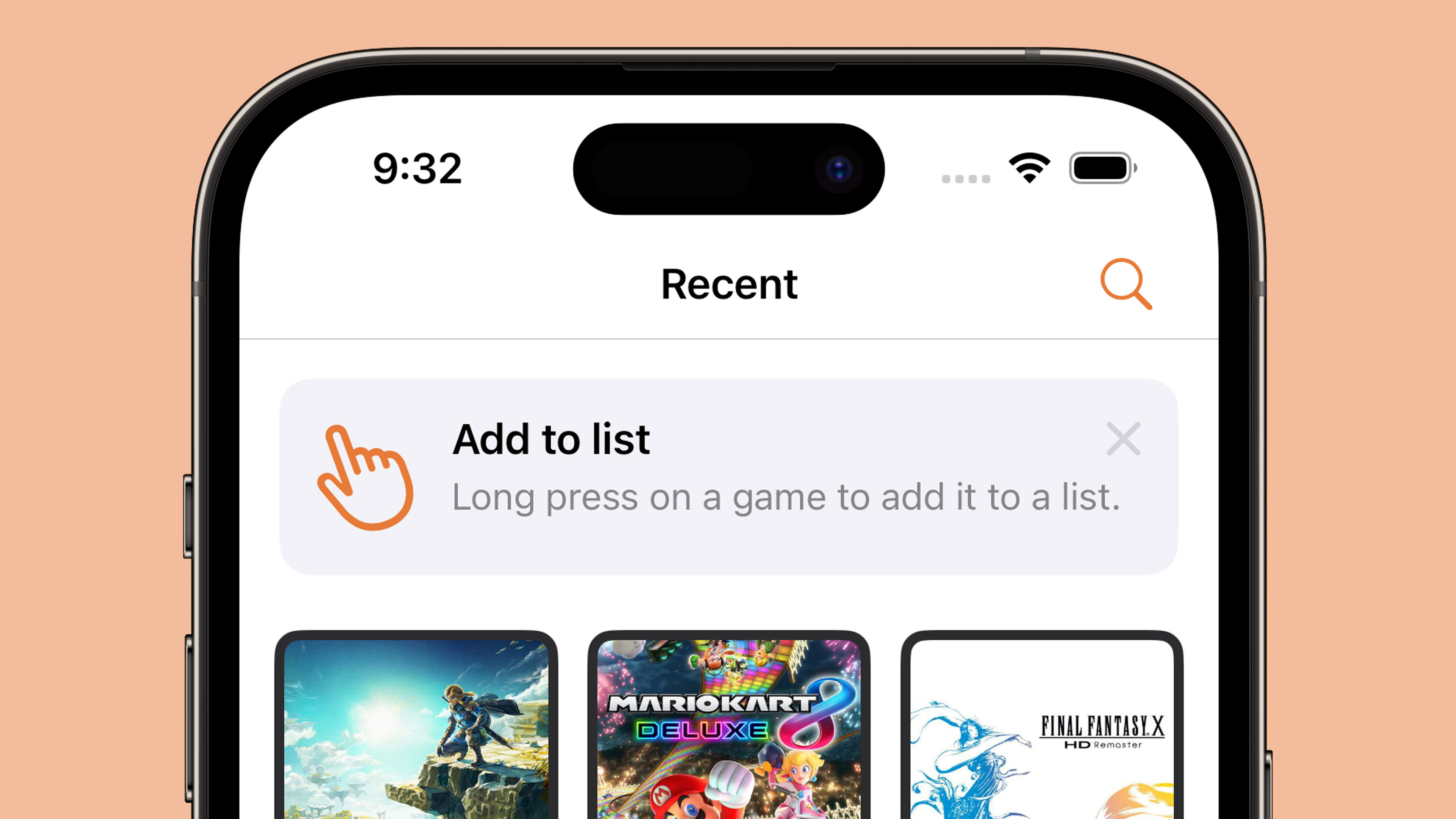
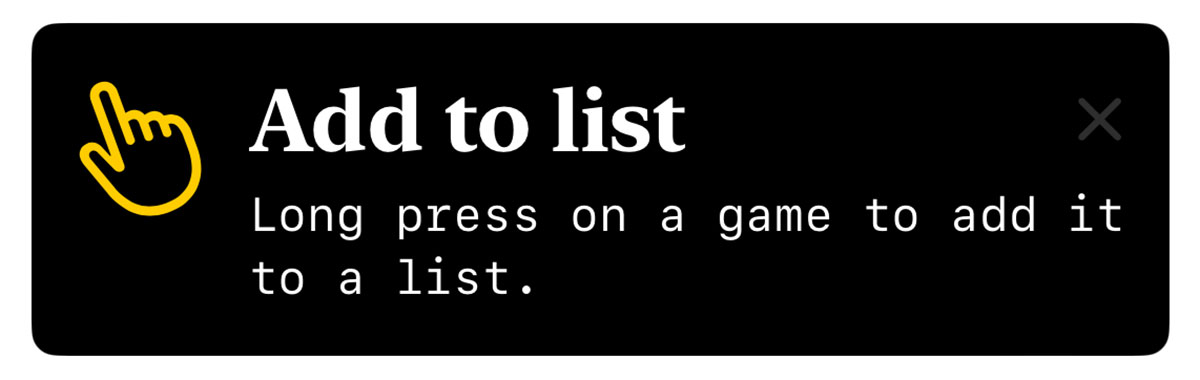
structLongPressTip:Tip{vartitle:Text{Text("Add to list").foregroundStyle(.white).font(.title).fontDesign(.serif).bold()}varmessage:Text?{Text("Long press on a game to add it to a list.").foregroundStyle(.white).fontDesign(.monospaced)}varasset:Image?{Image(systemName:"hand.point.up.left")}}
As the title and message both use Text, you can use any modifiers that return a Text instance such as foregroundStyle, font, and convenience methods like bold(). The icon is returned as an Image so if we want to change anything like the icon colour we have to do this from the Tip view itself:
Icon colour, background colour, and dismiss button colour
A method is provided to change the colour of the tip background itself but to change the icon colour we need to use a global tint whilst the dismiss button colour is affected by the foregroundStyle; note that this button appears to be 50% opaque so if you are using a dark background you’ll struggle to see anything other than white. There does not appear to be a way to alter this button with UIKit.
Whilst there are no Human Interface Guidelines for tips yet, looking through the iOS 17 beta and the WWDC 2023 talk shows that Apple uses un-filled SF Symbols for all of their tips. For this reason, I’d suggest doing the same!
The default corner radius for tips on iOS is 13. If you want to change this to match other curved elements within your app, you can do this with tipCornerRadius() in SwiftUI. UIKit does not have a way to change the corner radius of tip views.
A customised tip view with new colours and fonts. I know it's not pretty!
I was pleasantly surprised by how flexible the design was for this first version of TipKit. However, I’d urge caution in customising tips too far as having them match the default system tips is surely a boon in terms of user experience.
3. Lights, Cameras, Actions!
Tips allow you to add multiple buttons known as actions which can be used to take users to a relevant setting or a more in-depth tutorial. This feature is not available on tvOS.
To add an action, you first need to adjust your Tip struct with some identifying details:
Note that the Action initialiser also has an option to use a Text block rather than a String which allows for all of the colour and font customisations mentioned earlier.
An action button within a Tip View
With this in place, we can alter our tip view to perform an action once the button has been pressed:
Important: Whilst you can add actions in Xcode 15 beta 5, the handlers do not currently trigger when pressing the button regardless of whether you use the struct or view method to attach them.
One final thing to note on actions is that they can be disabled if you wish to grey them out for some reason (i.e. if a user isn’t signed in or subscribed to a premium feature):
varactions:[Action]{[Action(id:"pro-feature",title:"Add a new list",disabled:true)]}
4. Laying down the rules
By default, tips appear as soon as the view they are attached to appears on screen. However, you may not want to show a tip in a certain view until some condition has been met (i.e. the user is logged in) or you may want a user to have to interact with a feature a certain number of times before the tip is displayed. Luckily Apple has thought of this and added a concept known as “rules” to let you limit when tips will appear.
There are two types of rules:
Parameter-based: These are persistent and are matched to Swift value types such as booleans
Event-based: Defines an action that must be performed before a tip is eligible for display
Important: In Xcode 15 beta 5 there is a bug which will prevent the @Parameter macro from compiling for simulators or for macOS apps. The workaround is to add the following to the “Other Swift Flags” build setting:
The syntax is relativelty straightforward thanks to the new Macro support in Xcode 15. We first define a static variable for the condition, in this case a boolean detailing if the user is logged in or not. Next we provide a rule based on that condition being true.
If we ran our app now, the tip would no longer be displayed on launch. However, once we mark the static property as true the tip will show up the next time the relevant view is displayed:
The event-based rules are slightly different in that instead of a parameter we use an Event object with an identifier of our choosing. The rule then checks the donations property of this event to determine if the app has been opened three or more times. In order for this to work, we need to be able to “donate” when this event has occured. We do this by using the donate method on the event itself:
The donation on an event contains a date property that is set to the time at which the event was donated. This means you can add rules to check if somebody has opened the app three times or more today:
Important: Whilst this code should be possible according to the WWDC 2023 talk, it gives a “the filter function is not supported in this rule” when run on Xcode 15 beta 5.
5. To display, or not to display?
Whilst rules can limit our tips to displaying at the optimal time, there is always the possibility that multiple tips might try to display at the same time. It may also be that we no longer want to display a tip if the user interacts with our feature before our tip was displayed. To get around this, Apple provides us with ways to manage frequency, display count, and to invalidate tips. They also provide a mechanism for syncing the display status of your tips across multiple devices.
Frequency
By default, tips appear as soon as they are allowed to. We can change this by setting a DisplayFrequency when initiating our Tips store on app launch:
With this in place, only one tip will be able to appear each day.
There are several predefined values for DisplayFrequency such as .daily and .hourly but you can also provide a TimeInterval if you need something custom. Alternatively, you can restore the default behaviour by using .immediate.
If you have set a non-immediate display frequency but have a tip that you want to display immediately, you can do so by using the IgnoresDisplayFrequency() option on the Tip struct:
If a tip is not manually dismissed by the user then it will be reshown the next time the relevant view appears even after app launches. To avoid a tip being shown repeatedly to a user, you can set a MaxDisplayCount which will limit the number of appearances until the tip is no longer displayed:
Depending on our rules and display frequency, it may be that a user interacts with a feature before our tip has been displayed. In this case, we would want to invalidate our tip so that it is not displayed at a later date:
There are three possible reasons for a tip to be invalidated:
maxDisplayCountExceeded
userClosedTip
userPerformedAction
The first two are performed by the system depending on whether the display count or the user caused the tip to be dismissed. This means you will always want to use .userPerformedAction when invalidating your tips.
TipKit can also sync tip status via iCloud to ensure that tips seen on one device won’t be seen on the other. For instance, if someone using the app has it installed on both an iPad and an iPhone, and the features are identical on both of those devices, it’s probably best to not educate them on both devices about the feature.
This feature appears to be enabled by default with no options for disabling it meaning you’ll need to provide custom identiers for each tip on the platforms you support if you want to make sure tips are re-displayed on every device for some reason (i.e. if the UI is significantly different between devices).
6. Debugging
TipKit provides convenient APIs for testing, allowing you to show or hide tips as needed, inspect all the tips without satisfying their rules, or purge all info in the TipKit data store for a pristine app build state.
// Show all defined tips in the appTips.showAllTips()// Show the specified tipsTips.showTips([searchTip,longPressGameTip])// Hide the specified tipsTips.hideTips([searchTip,longPressGameTip])// Hide all tips defined in the appTips.hideAllTips()
If we want to purge all TipKit related data, we need to use the DatastoreLocation modifier when initialising the Tips framework on app launch:
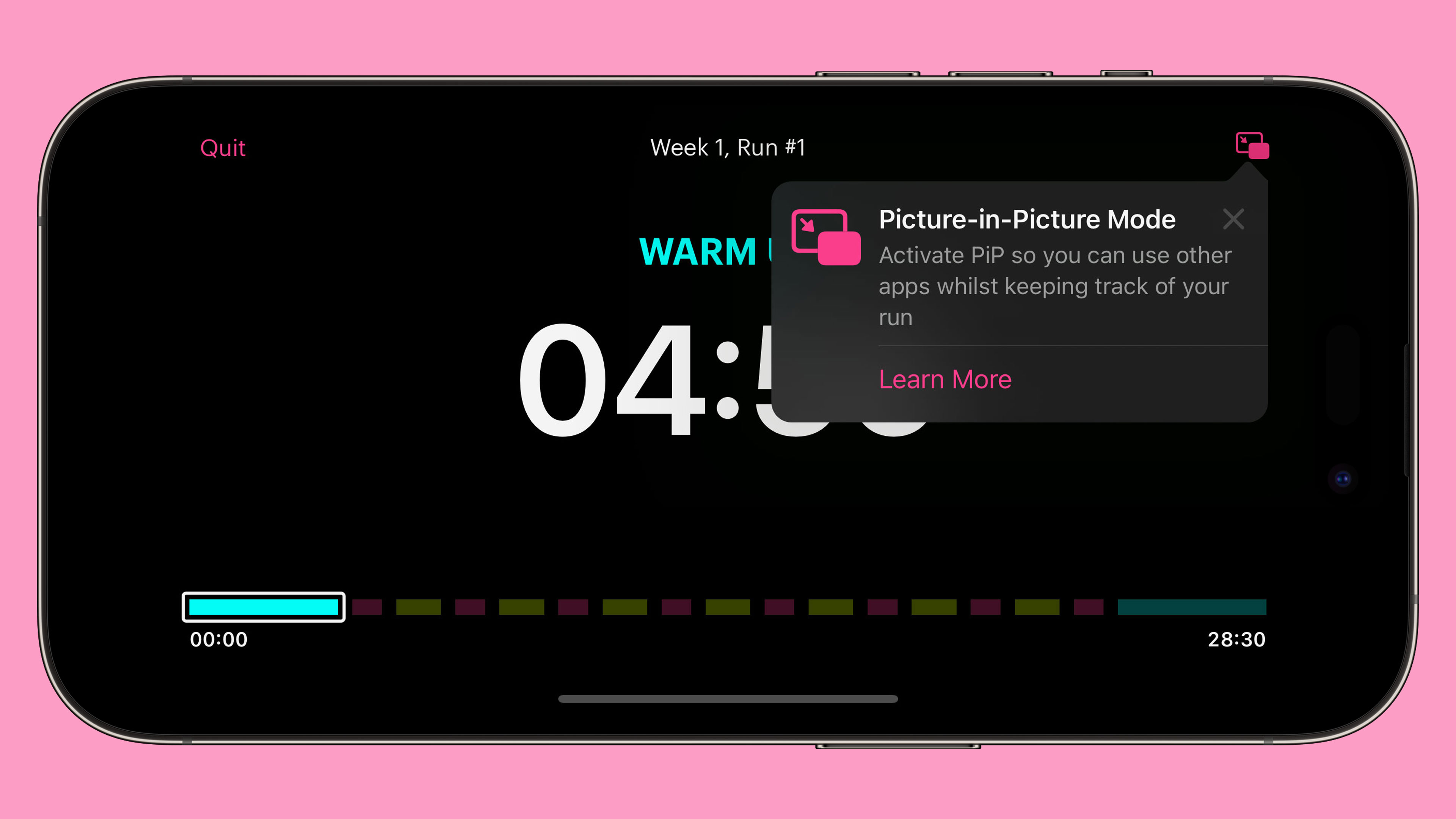
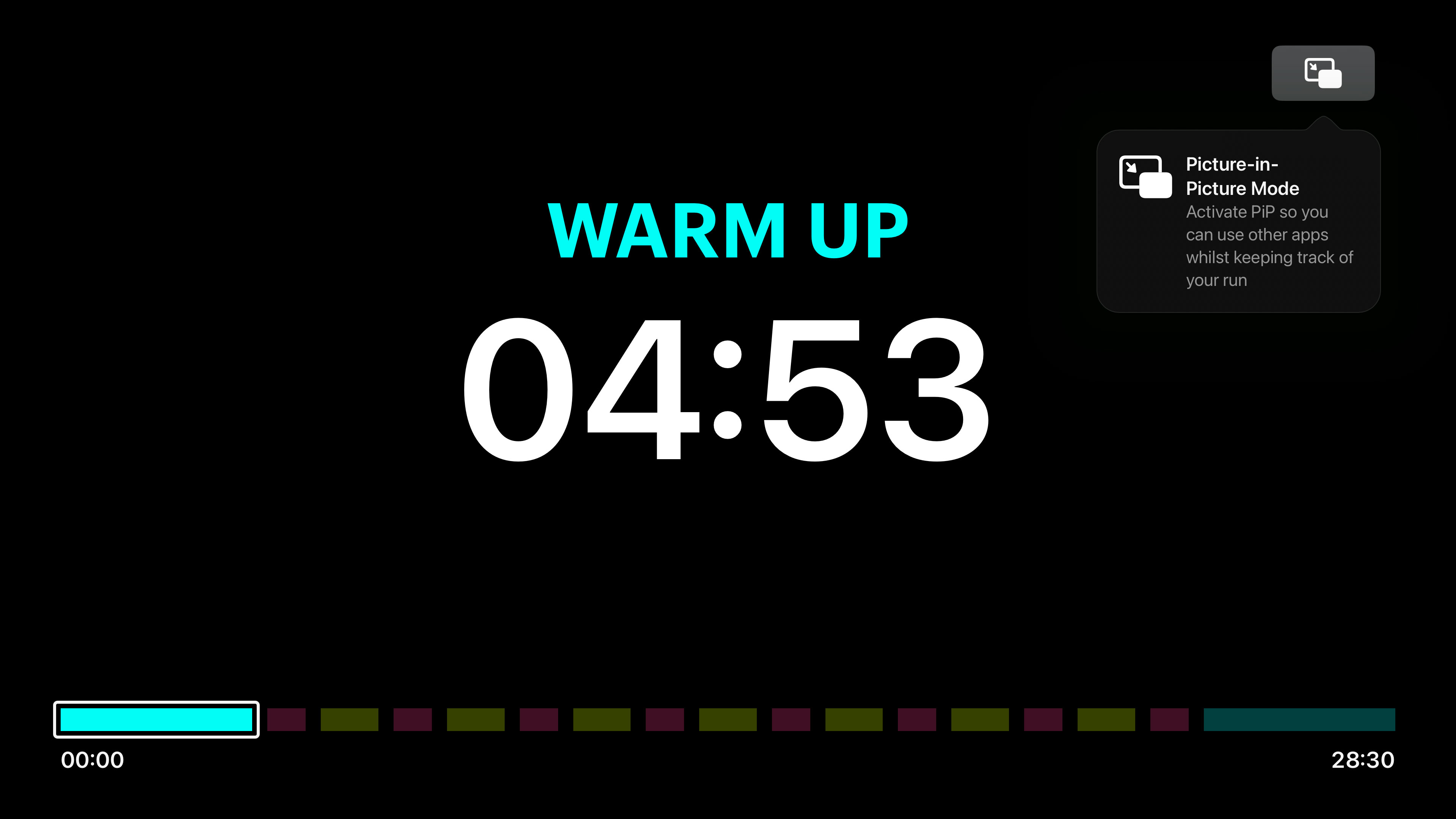
A tip displayed in my "Chaise Longue to 5K" tvOS app
Tips are instrumental in helping users discover features in your app be it on iOS, iPadOS, macOS, watchOS, or tvOS. Remember to keep your tips short, instructional, and actionable, and make use of the rules system, display frequency, and invalidation to ensure tips are only shown when they need to be.
As we get to the final month before WWDC 2023, I’m reminded of all the new APIs that were released at WWDC 2022 that I haven’t made use of yet. One of those new APIs was the DeviceDiscoveryUI framework which allows an Apple TV app to connect and communicate with an iPhone, iPad, or Apple Watch.
A good example of this would be how the Apple Watch communicates with the Apple Fitness app:
It’s not necessarily a fair comparison as whilst you might expect them to be the same, the DeviceDiscoveryUI framework has a number of restrictions:
It only works on tvOS (so you can’t communicate between an Apple Watch and an iPad like Apple Fitness can)
It only works on Apple TV 4K (Apple Fitness can work with Apple TV HD)
The tvOS app can only connect to one device at a time (i.e. you couldn’t make a game with this that used two iPhones as controllers)
The tvOS app can only connect to other versions of your app that share the same bundle identifier (and are thus sold with Universal Purchase)
This will not work on either the tvOS or iOS simulators. You must use physical devices.
The UI for the connection setup is also different to Apple Fitness as we will see shortly.
My use case for this technology is a bit convoluted as I was really looking for an excuse to use it rather than the best fit. I have a personal app named Stoutness that I use on my Apple TV every morning to give me a briefing on my day whilst I do my chiropractic stretches. Using shortcuts and various apps on my iPhone, I send a ton of data to my server which the Apple TV app then fetches and uses. The app also communicates directly with some 3rd party APIs such as YouTube and Pocket.
One of the main reasons for the app is to get me to work through my backlogs of games, books, videos, and articles by having the app randomly pick from my various lists and presenting them to me; I then know “out of the 4 books I’m currently reading, I should read x today”. The problem is that later in the day I often forget what the app had decided I should use, a particular problem when it suggests 5 articles for me to read from a backlog of about 200 😬. Whilst I cache this information daily in the Apple TV app, it’s a bit of a pain to fire it up just to skip through a few screens and remember what I should be reading. Surely this information would be better on my phone?
The obvious way to do this would be for the server to make the calls to Pocket and YouTube and then store the daily cache in my database along with the random choices of games and books. An iOS app could then download that in the same way the tvOS app does. This is true, but it’s not as fun as learning a new framework and having my phone connect to the Apple TV to a) send all the data that my shortcuts used to do directly and b) have the cache be sent back in response ready to be used on iOS.
After a brief look at the docs, I naively assumed this would be done in an hour as it looked vaguely similar to the way in which an iPhone app can talk to an embedded Apple Watch app or a Safari extension via two way messaging. After 4 hours, I finally got something working but it does not feel as solid as I would like…
Apple provide a developer article titled “Connecting a tvOS app to other devices over the local network” that sounds like it should be exactly what we need. It details how we present the connection UI (in both SwiftUI and UIKit), how to listen for the connection on iOS / iPadOS / watchOS, and how to initiate the connection. However, there are two issues with this article.
First of all, most of the code in it doesn’t actually compile or is being used incorrectly. The SwiftUI code references a “device name” variable which isn’t present1, fails to include the required “fallback” view block (for displaying on unsupported devices like the Apple TV HD), and presents the device picker behind a connect button failing to notice that the picker itself has it’s own connect button which sits transparently above the one you just pressed.
For the UIKit code, it references an NWEndpointPickerViewController which doesn’t exist. The correct name is DDDevicePickerViewController.
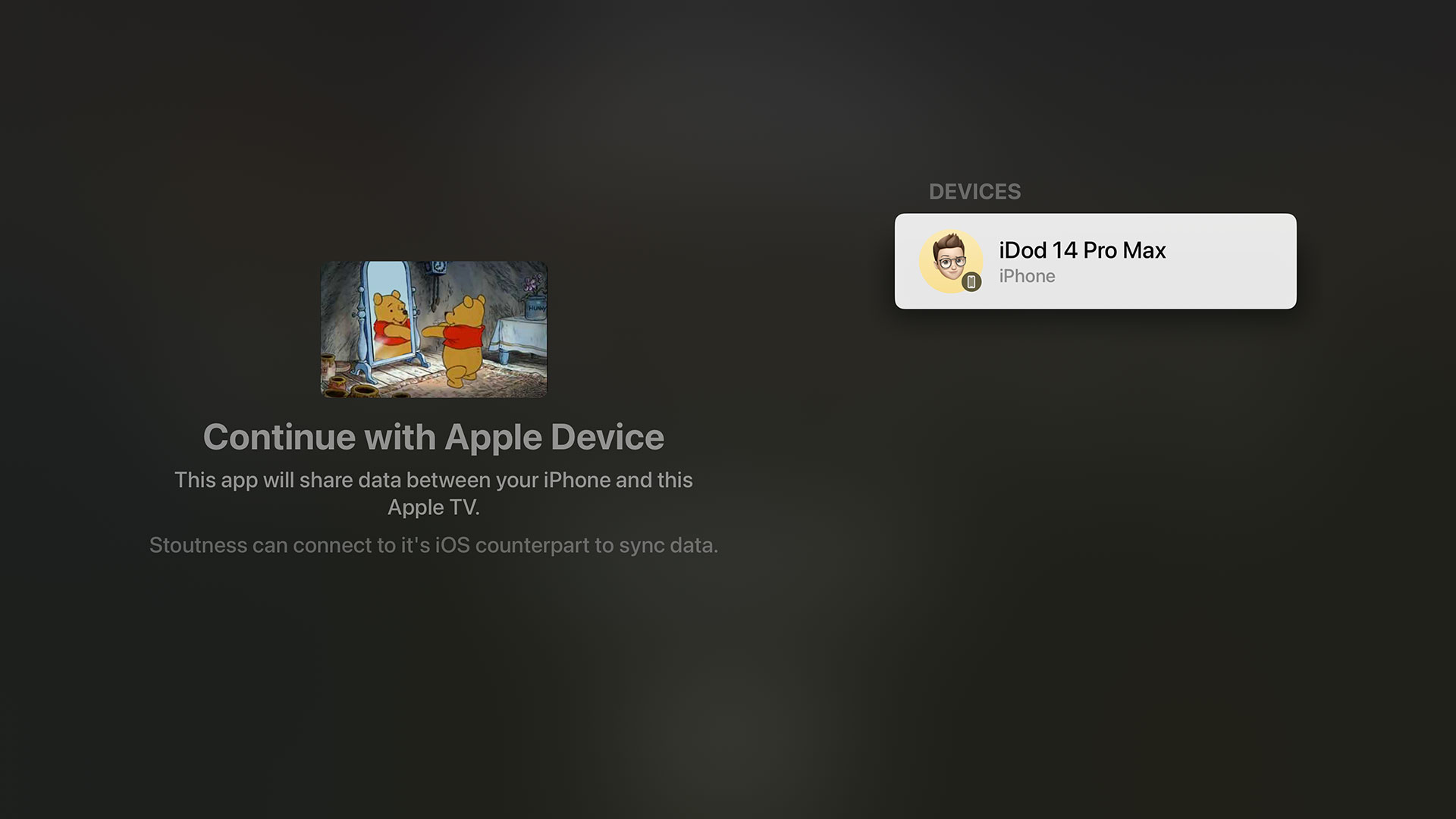
Once the actual picker is presented, things start to look very promising. You get a fullscreen view that shows your app icon with a privacy string that you define within Info.plist on the left hand side whilst any applicable devices are listed on the right hand side:
An important thing to note here is that the devices do not necessarily have your app installed, they are merely devices potentially capable of running your app.
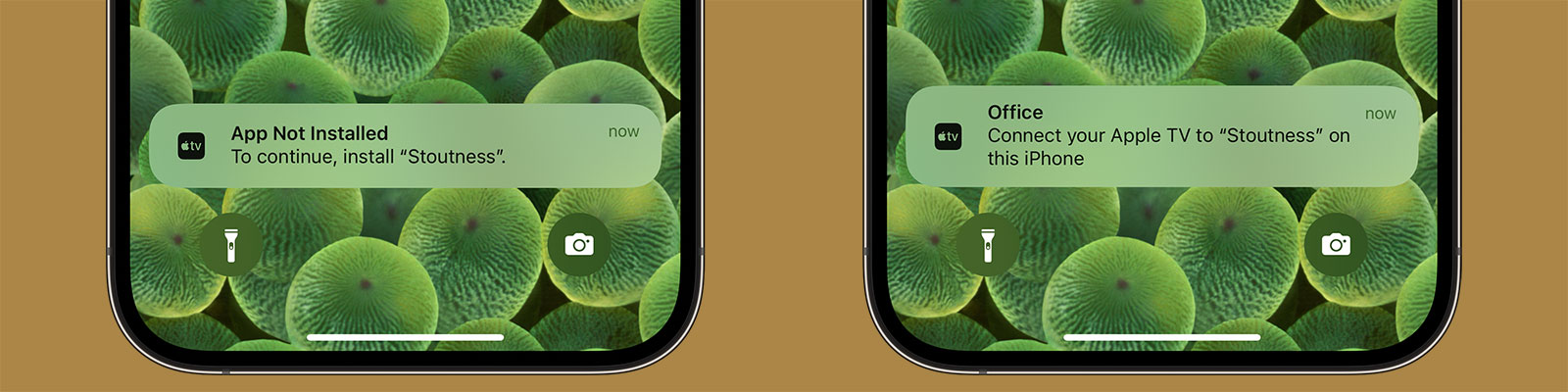
When we initiate a connection to an iPhone, a notification is displayed. The wording can’t be controlled and will be different depending on whether the corresponding app is installed or not:
Connection notification request for iOS from tvOS both with and without the app installed. If the app is installed, the notification uses the Apple TV name for the title (“Office” in this case).
You seem to have around 30 seconds to accept the connection otherwise the tvOS interface goes back a step and you need to send a new request. If you do not have the app installed, tapping the notification will take you to the App Store page.
We now come to the second problem in Apple’s documentation:
As soon as the user selects a device, the system passes you an NWEndpoint. Use this endpoint to connect to the selected device. Create an NWConnection, passing it both the endpoint and the parameters that you used to create the device picker view. You can then use this connection to send or receive messages to the connected device.
The emphasis above is mine. This is the extent of the documentation on how to actually use the connection to send and receive messages. It turns out that the connection uses classes from the In-Provider Networking that was introduced in iOS 9 specifically for network extensions. In fact, this is still the case according to the documentation:
These APIs have the following key characteristics:
They aren’t general-purpose APIs; they can only be used in the context of a NetworkExtension provider or hotspot helper.
There is zero documentation on how to use these APIs in the context of Apple TV to iOS / iPadOS / WatchOS communication 🤦🏻♂.
In terms of sending messages, there is only one method aptly named send(content:contentContext:isComplete:completion:). This allows us to send any arbitrary Data such as a JSON-encoded string.
The real problem is how to receive those messages. There is a method named receiveMessage(completion:) which, based on my work with watchOS and iOS extensions, sounds promising. Apple describes it as “schedules a single receive completion handler for a complete message, as opposed to a range of bytes”. Perfect!
Except it isn’t called, at least not when a message is sent. In a somewhat frustrating act, the messages only appear once the connection is terminated either because the tvOS app stops or because I cancel the connection. I tried for multiple hours but could not get that endpoint to fire unless the entire connection was dropped (at which point any messages that were sent during that time would come through as one single piece of data). I can only assume the messages are being cached locally without being delivered yet when the connection drops it suddenly decides to unload them 🤷🏻♂.
It turns out you need to use the more complex receive(minimumIncompleteLength:maximumLength:completion:) which requires you to say how big you want batches of data to be. You also need to resubscribe to this handler every time data appears on it. The problem here is that whilst there is a “completion” flag to tell you if the whole message has arrived this is never true when sending from tvOS, even if you use the corresponding flag on the send method. In the end, I limited the app to 1MB of data at a time as everything I send is well below that. I’ve never run into a problem with only partial data being sent but it is a potential risk to be aware of.
If you were using this for critical data, I’d probably suggest only sending encoded text and providing your own delimiter to look for i.e. for each string that comes in batch them together until one ends in a “|||” at which point you will know that was the end of a message from tvOS.
On the positive side, the connection setup and data sending are near instantaneous and the user facing UI works well. However, as there were already low-level network solutions to send data between devices (including non-Apple devices) it’s incredibly odd to me that Apple went to the effort of creating a beautiful device pairing API and UI for both SwiftUI and UIKit but didn’t extend that to the basics of sending data. Local networking is hard. I have no interest in diving into the minutia of handling UDP packets; I just want to send some basic strings between devices!
In order to get this all working for my own app, I created a class named LocalDeviceManager that handles this all for you along with a SwiftUI demo project for both tvOS and iOS that demonstrates how it works. The call site on tvOS is very simple:
@ObservedObjectprivatevardeviceManager=LocalDeviceManager(applicationService:"remote",didReceiveMessage:{datainguardletstring=String(data:data,encoding:.utf8)else{return}NSLog("Message: \(string)")},errorHandler:{errorinNSLog("ERROR: \(error)")})@StateprivatevarshowDevicePicker=falsevarbody:someView{VStack{ifdeviceManager.isConnected{Button("Send"){deviceManager.send("Hello from tvOS!")}Button("Disconnect"){deviceManager.disconnect()}}else{DevicePicker(.applicationService(name:"remote")){endpointindeviceManager.connect(to:endpoint)}label:{Text("Connect to a local device.")}fallback:{Text("Device browsing is not supported on this device")}parameters:{.applicationService}}}.padding()}
Similarly, it’s trivial to set up an iOS app to communicate with the tvOS app:
@ObservedObjectprivatevardeviceManager=LocalDeviceManager(applicationService:"remote",didReceiveMessage:{datainguardletstring=String(data:data,encoding:.utf8)else{return}NSLog("Message: \(string)")},errorHandler:{errorinNSLog("ERROR: \(error)")})varbody:someView{VStack{ifdeviceManager.isConnected{Text("Connected!")Button{deviceManager.send("Hello from iOS!")}label:{Text("Send")}Button{deviceManager.disconnect()}label:{Text("Disconnect")}}else{Text("Not Connected")}}.padding().onAppear{try?deviceManager.createListener()}}
There are more details on how this works on GitHub.
Judging by the complete lack of 3rd party apps using this feature or articles detailing how to use this API I’m going to go out on a limb and say it’s unlikely we’ll see any improvements to this system in tvOS 17. Regardless, I’ve filed a few bug reports in the hopes that the documentation can be tidied up a bit. Just be aware that this is not the robust solution I was hoping it would be!
I have been unable to divine a way to get the name of the device you are connected to. ↩︎
It’s been 4 weeks since the v2.0 update for Music Library Tracker launched so I thought now was a good time for a retrospective to detail how I promoted the app and how well it performed.
By way of a bit of background, the app originally launched back in January 2016 at a $0.99 price point making $1368 in it’s first month before dropping off significantly to roughly $20 a month. In January 2021, I was accepted into the App Store Small Business Program which meant the amount Apple took from sales fell from 30% to 15%; I had also increased the price and released a few more updates so the average profit for the half year prior to the v2.0 update in February was sitting at around $80 a month1. This is by no means an income (especially as I have to pay corporation tax on it in the UK and then if I want to actually take the money for myself rather than my business I’ll have to pay some more tax) but it was fine for an app that didn’t have any running costs nor require much maintenance.
And then v2.0 happened.
With a new feature set built around Spatial Audio, v2.0 was released on 13th February 2023 after a 9 month development period, 3 months of which was open development via my newsletter. It was reported on by a couple of tech sites (I’ll detail how shortly) and ended up being the #8 Paid app in the US!
So how much money does an app need to make to be in the Top 10 of all paid apps on the App Store?
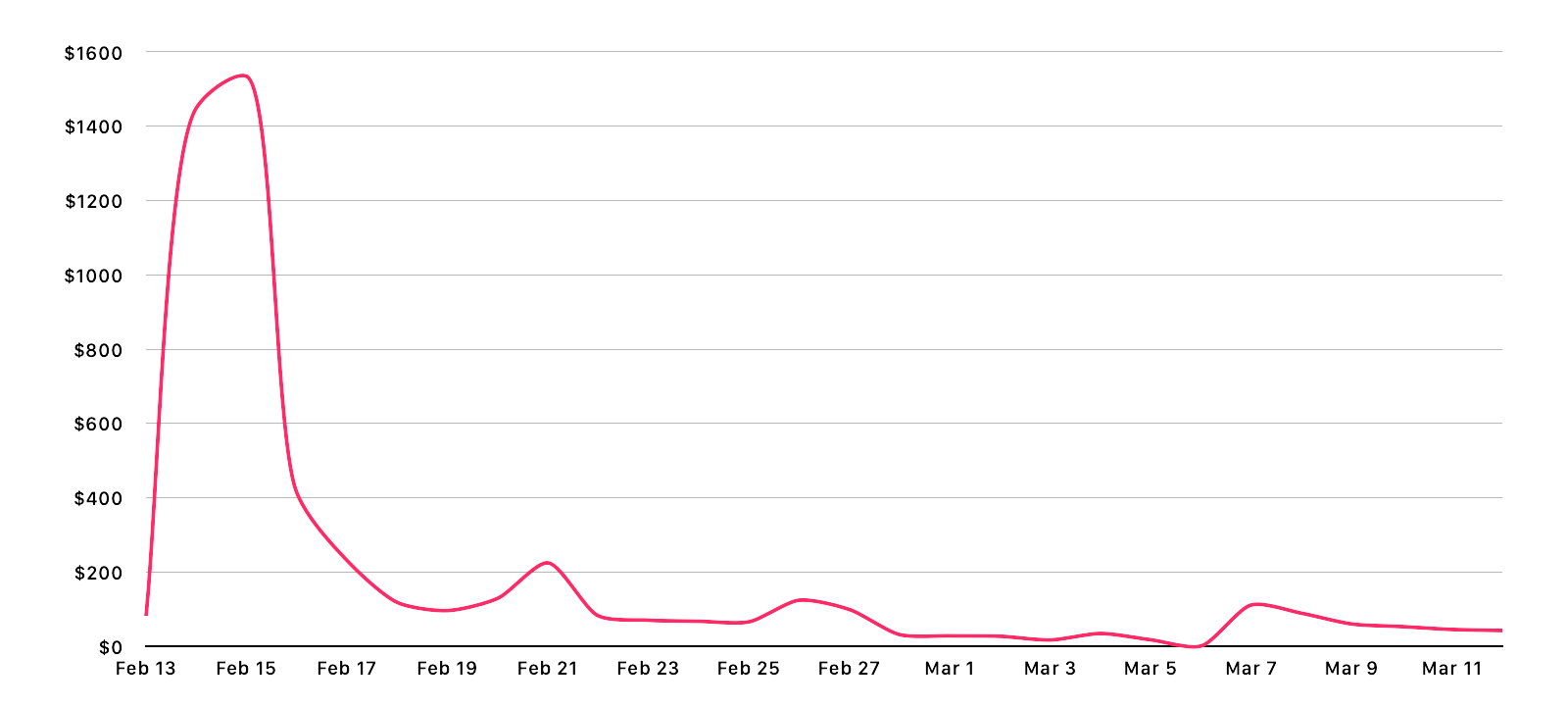
Daily profit in USD over the past 28 days peaking at $1534 on February 15th
Profit of $82 on 13th Feb (launch day), $1449 on 14th Feb, $1534 on 15th Feb, and $414 on 16th Feb
Total profit of $5351 over 28 days
An average daily profit of $191
Only a single sale on March 6th 😭
I use Daily Sales Email to find out how much I’ve made each day but the figures typically arrive around lunchtime on the following day. That meant I could see the app in the Top 10 of all paid apps but had no idea what that would translate into2. I’ll confess that whilst I was pleased with the numbers, I was a little disappointed that I’d made less than what I charge for 2 days as a freelance iOS developer.
That said, the app has settled down into making roughly $40 per day which works out at around $1200 per month, not bad for something that will hopefully only need minor maintenance.
With the financial breakdown out of the way, I thought it might be interesting to detail exactly how I promoted the app. I will be completely honest and say it is not my strong suit at all. I hate doing app promotion work; it is abhorrent to me. I’m not sure if it’s the Englishman in me or something else but I absolutely hate having to email people saying “please look at my app” followed by the waiting and hoping that somebody will feature it. However, that’s what I had to do as an app of this nature likely isn’t going to generate enough revenue to make hiring a marketing person cost effective.
Reviews
The key thing for an app like this is for it to be written about by a tech site. I’ve had a couple articles in the past from sites like 9to5mac and MacRumors so my first port of call was to send them an email. As previously mentioned, I hate doing this stuff but I felt on slightly firmer ground with these sites as they’d written about the app before so that seemed like a good “in”:
Hello,
Back in 2016 you were kind enough to review an app of mine, Music Library Tracker (https://9to5mac.com/2016/03/15/music-tracker-large-libraries/).
I’m getting in touch as I’ve just released a large v2.0 update to the app which includes some features around Spatial Audio. In short, the app can quickly scan your library and show you exactly which songs have been upgraded to Spatial Audio and generate a playlist containing just those tracks; it will then run in the background periodically and notify you as and when tracks are upgraded and keep that playlist up to date.
This is all possible due to a database of Dolby Atmos and Dolby Audio tracks I’ve created over the past 9 months to run my Spatial Audio Finder website (https://bendodson.com/projects/spatial-audio-finder/) and the @NewSpatialAudio Twitter account (https://twitter.com/NewSpatialAudio) which tweets whenever a new track is upgraded. This database is sourced from a minor update to the Apple Music API at WWDC 22 - you can see how this all works in a blog post I wrote last year (https://bendodson.com/weblog/2022/06/27/spatial-audio-finder/) but suffice to say I do not believe there is anyone outside of Apple with a dataset such as this.
Apple Music does not yet have a clear strategy for displaying Spatial Audio tracks. Whilst they have some playlists and collections that get updated weekly, the only way to tell which tracks in your own library are upgraded is to play them and see. This is obviously not ideal and not a great way to showcase what is a genuine leap in musical quality and the hundreds of thousands of tracks that have been upgraded. I created this feature as I was determined to find a way to see which tracks had been updated. From the response I’ve received via @NewSpatialAudio it seems I’m not alone!
The app is still a single cost download (25% off for the next week) with no in-app purchases, subscriptions, or adverts so anybody who downloaded the app in the past 7 years will get this new feature for free. I’ve provided a few promo codes below in case you or anyone at the MacRumors team are interested in taking a look:
CODE1
CODE2
CODE3
You can see some more information about the app at https://dodoapps.io/music-library-tracker/ and there is a full media kit with screenshots, etc, at https://dodoapps.io/music-library-tracker/media-kit/
The update is available now on the App Store at https://apple.co/3XtdAga
If you have any questions at all about the app, my Spatial Audio database, or anything else relating to Spatial Audio then just let me know.
All the best,
Ben
I sent this email on the 13th February to the reviews@9to5mac.com address (as my previous contact had since moved elsewhere) and a very similar version with a different link directly to the Senior Editor at MacRumors who wrote a previous article. I got a very strange bounceback email from 9to5mac and I didn’t get a reply at all from MacRumors. As the bounceback was so odd, I waited a day and then sent a follow up email to tips@9to5mac.com; it was a good thing I did as Chance Miller got in touch within 30 minutes and shortly afterwards there was an article published. This is undoubtedly what led to the spike in sales on the 14th and afterwards.
In addition to those two outlets, I sent similar emails to:
TechRadar (via news@techradar.com): their Entertainment Editor replied after a couple of hours and we had a few emails back and forth discussing various aspects of Spatial Audio such as how Apple bans AI upscaling. They published an article the next day but it didn’t show up in their RSS feed and is not visible on their website unless you follow the direct link (which was tweeted but had practically zero engagement)
AppleInsider (direct to one of their writers who had written a recent article about Spatial Audio): I didn’t get a reply and there hasn’t been an article
MacStories (direct email to John and Federico): I didn’t get a reply but it was listed in the “App Debuts” section of the Club MacStories newsletter for paid subscribers
The following week I sent an email to iMore as I’d noticed an interesting article relating to Spatial Audio. I couldn’t find an email address for the author, Tammy Rogers, so instead sent an email direct to the Features Editor, Daryl Baxter, who was listed as a contributor:
Hi Daryl,
I came across a recent article you contributed to, “Apple Music is showcasing non-Spatial Audio albums in it’s Spatial Audio page”, and had two things that may be of interest to you and Tammy (I couldn’t find an email address for her so my apologies for not including her as well).
First of all, the reason that those albums are being listed within Apple Music’s Spatial Audio playlists is because they have some tracks on them that are available in Spatial Audio. The referenced No Pressure by Logic has two tracks that have been upgraded (GP4 and Perfect) whilst McCartney (2011) remaster has the first 13 tracks available in Spatial Audio. I know this because I created something called the Spatial Audio Finder which lets you find which tracks have been updated for a particular artist (I’ve got a blog post at https://bendodson.com/weblog/2022/06/27/spatial-audio-finder/ which explains how that all works). I also publish when tracks are upgraded to the @NewSpatialAudio Twitter feed.
You also mentioned in the article that it’s quite hard to find Spatial Audio tracks within Apple Music. This is a huge bugbear of mine and so I recently updated an app of mine, Music Library Tracker, with some new features around Spatial Audio. The app was originally designed to help notify you when Apple changes your music (i.e. if a song is deleted due to licensing changes, etc) but it can now scan your library and show you which tracks you have that are available in Spatial Audio along with creating a playlist in Apple Music containing only those tracks. It can then keep monitoring your library and send you notifications as and when new tracks are updated.
The rest of the email is similar to the initial one above
I received a reply a few days later and then after 2 weeks an article appeared.
In addition to the sites I reached out to, a few sites published articles organically including:
I’d like to give a big thank you to all of the people who did get back to me or wrote about the app - I’m very grateful! However, the experience of doing this is easily the worst part of being an independent app developer. I absolutely hate having to hawk the app around and then have the long period of waiting and hoping for an article to appear. I always try and craft my emails to be very specific to something the site has covered before or to provide some kind of story so it’s a bit easier to form a narrative other than “please talk about my app”. It’s incredibly disappointing when you don’t even get an email back. As I hated doing it, I’d typically send an email and then think “that’ll do” and by the time I realised a site wasn’t going to pick it up then the launch window had passed and it felt even more awkward to email in (especially as it had already been covered by 9to5mac so other sites could have potentially already seen that article and not wanted to cover something which is now old news).
A few things I should have done differently:
I should have contacted people before the launch of the app rather than afterward. I don’t like contacting anyone before Apple have approved an app as that can lead to all sorts of problems. I’d already public committed to a date and didn’t give myself much room between approval and release so just sent the messages out post-launch. In an ideal world, I should have had a week or even two with the app approved within which I could have sent out promo codes or TestFlight invites so the app could be reviewed and embargoed. That would lead to a much bigger “splash” and also avoids the issue of sites potentially not wanting to promote an app that has already been promoted elsewhere.
I should have written to more sites rather than just the ones I typically read. I did do some research to find sites that had talked about Spatial Audio (as I wanted some kind of an “in” when writing to someone who’d never heard of me before) but I probably should have just gone with a scattergun approach to anybody that is even vaguely app adjacent.
I had no idea if the promo codes I was sending out were being used so couldn’t really tell if my emails were getting through. Once you’ve generated a promo code within App Store Connect, the only way to see if it has been redeemed or not is to try and redeem it (which is obviously not a good idea). I could easily just provide a link to my site which, when accessed, gives out a promo code and can then tell me that has happened but it just doesn’t sit right with me and I’d be afraid it would be something that would put people off.
I should have followed up with the sites that didn’t reply to me. I did that with 9to5mac which definitely paid off but I felt more comfortable doing that as it seemed clear there was a technical error; sending a “sorry but did you get my email?” shouldn’t really be anxiety inducing but I couldn’t bring myself to do it.
If you are a writer for a tech site with any insight or a developer that has had any success stories with this then I’d absolutely love to hear from you!
Getting Featured on the App Store Form
When you’re looking at ways to promote an app, getting featured by Apple on the App Store is obviously a high priority goal. There have been several articles recently about using the dedicated form on the Apple Developer website with the key takeaway being to submit the form for every app update.
I have never used this form before, mostly because my apps tend to either be very niche or are something like this app which I’m always somewhat surprised makes it through App Review in one piece 😆. However I did it use it and something unexpected happened… I got an email from the Apple Services Performance Partnership Team3:
We are currently recruiting new partners to promote the latest of Apple’s products to join the programme: Apple MusicKit.
MusicKit lets users play Apple Music and their local music library from your app or website. So, when your users provide permission to access their Apple Music account, they can use your app or website to create playlists, add songs to their library, and play any of the millions of songs in the Apple Music catalog! If your app detects that the user is not yet an Apple Music member, you can offer a trial membership from within your app. The Apple Music Affiliate Program allows you to earn a commission on eligible referred Music memberships (new sign-ups only)! You can find more detailed information here as well as in the document attached.
We have noticed that you already use the Apple Music API and we believe adding in MusicKit would be an easy process for you and a great benefit! We offer generous compensation models and would like to talk you through this opportunity in more detail.
Please let us know your avails, so we can go ahead and schedule a call with you. 😊
I did take the call4 and it is effectively outreach to try and get developers to promote Apple Music within their apps in exchange for a commission on any new subscriptions. You can already apply for this directly but I guess Apple saw that I was using MusicKit on the form I filled out and so set this up. Unfortunately it’s not really a good fit for this app (you’re likely not using it if you don’t have Apple Music) but it may be useful for another app I have in the pipeline in which I’d already added the “Subscribe to Apple Music” interstitial that this hooks into.
Going back to the form, the app has not been featured anywhere on the App Store but I had very little expectation of that happening.
App Store Ads
I took a look at promoting the app using Apple Search Ads and found that it was recommending a suggested “Cost-per-Install” of £5.61. This is not ideal bearing in mind the app cost £2.49 at the time 🤣
After I posted that on Twitter the developer of the excellent Marvis Pro music app, Aditya Rajveer, reached out and said “It almost never reached the suggested amount per install for my app, not even close”. That pushed me to give it a try and they were right! I’ve had it running for a few weeks now and have had 22 installs on an average Cost-Per-Install of £0.89. That’s not exactly setting my sales alight but it’s better than nothing. On a more positive note, I’m not actually being charged for these installs as I have a promotional balance apparently. I seem to remember I claimed a free $100 of advertising years and years ago so evidently that is still in use 🤷🏻♂
App Store In-App Events
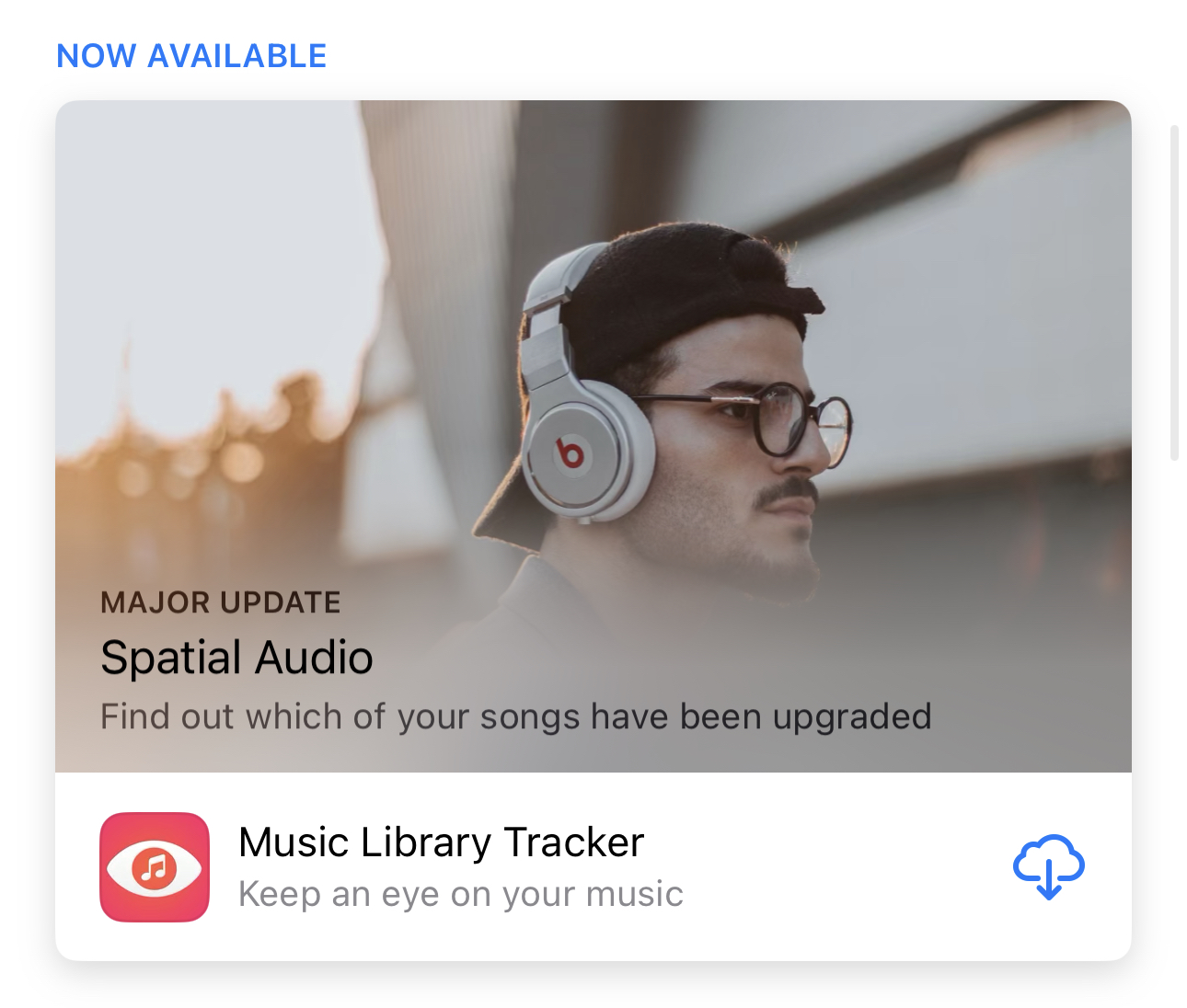
I created an In-App Event on the App Store to coincide with the release of the update which ran for 1 week:
The irony is that you can't listen to Spatial Audio on those headphones but it was the only decent royalty-free image I could find...
This had 4700 impressions leading to 9 downloads and 24 app opens. Again, not terribly exciting but extra sales are extra sales.
App Store Connect provides a metrics panel which roughly details where your downloads have come from. Rather astonishingly, it turns out that 43.4% of all my downloads in the past month came from “App Store Browse”. This is followed by “Web Referer” at 28.3%, “App Store Search” at 13.4%, and “App Referer” at 12.8%.
If I dig into that a little more I can see that most of the app referer traffic was either Facebook, Google, or Google Chrome (so likely clicking on links from one of the published articles). With web referer, the vast majority is 9to5mac.com followed by my own Dodo Apps website. Everything else is single digits.
My assumption is that the 9to5mac article created enough downloads to catapult the app up the Paid App charts and it was there that it was discovered by those just browsing the App Store who then made up the majority of my sales. This seems incredibly backwards to me as I’d assume the technical readership for whom this app is more likely aimed at would be the majority of downloaders but I suspect that with the billions of iOS devices in the world even a fractional percentage of users browsing the App Store is going to be magnitudes larger than the number of followers that the tech sites have.
In terms of next steps, I’m at a slight loss as to what to do as I don’t have any big splashy features that would merit the coverage that is clearly key to increasing the number of downloads. Having looked at what other developers are doing, it looks like I should try finding an influencer on TikTok but I know absolutely nothing about that world. I could also look at direct advertising on some of the tech sites or podcasts that would be relevant but doing so is likely going to be thousands of pounds worth of investment and feels like a bit of a gamble given this is a low-cost paid app rather than a subscription based service that can recoup large advertising costs over months of later usage.
You can download my historic monthly breakdown if you’re interested. With the change from a 70/30 split to an 85/15 split for the last 2 years, the actual amount I’ve given to Apple over the past 7 years has been around 26% leaving an average monthly profit of $59.83. ↩︎
I don’t use any analytics in my apps so I couldn’t see any realtime usage information. ↩︎
It definitely came as a result of submitting that form as the email was sent to my personal address which I’d used on the form, not my Apple Developer account email address. ↩︎
I nearly didn’t as they inexplicably used Microsoft Teams 🤣 ↩︎
This is part of a series of blog posts in which I showcase some of the side projects I work on for my own use. As with all of my side projects, I’m not focused on perfect code or UI; it just needs to run!
If I’m going on a long drive with my two young children, I’ll load up an iPad with some videos and stick it in a pouch on the back of a seat to keep them entertained. Initially this started as a few films and a couple of their TV series on a USB-C stick but I’ve gradually started putting a few shows directly onto the iPad so they can be played via VLC. Why? Well, when using an external drive you’re limited to using the Files app which uses Quick View for video playback; this is fine for a film but for TV you have to go and start a new episode after the previous one finishes (and that involves my wife precariously leaning into the back without a seatbelt which isn’t ideal). I moved to using VLC for TV shows as they then play sequentially avoiding that problem but it can’t play from an external drive so I have to put things directly onto the limited storage of the device.
For a couple of weeks I’ve been toying with the idea of whether I could build a better app, one that would let me:
Plug in an external drive
Show each series with a nice image
Play episodes randomly without needing to copy the video to the device
After a 3 hour drive to visit my mother, the priority for this has now increased exponentially 😂
To begin with, I needed to know if it is even possible to view external files within an app on iOS. It is, and has been since the introduction of UIDocumentPickerViewController in iOS 13 however the documentation left me a little confused:
Both the open and export operations grant access to documents outside your app’s sandbox. This access gives users an unprecedented amount of flexibility when working with their documents. However, it also adds a layer of complexity to your file handling. External documents have the following additional requirements:
The open and move operations provide security-scoped URLs for all external documents. Call the startAccessingSecurityScopedResource() method to access or bookmark these documents, and the stopAccessingSecurityScopedResource() method to release them. If you’re using a UIDocumentsubclass to manage your document, it automatically manages the security-scoped URL for you.
Always use file coordinators (see NSFileCoordinator) to read and write to external documents.
Always use a file presenter (see NSFilePresenter) when displaying the contents of an external document.
Don’t save URLs that the open and move operations provide. You can, however, save a bookmark to these URLs after calling startAccessingSecurityScopedResource() to ensure you have access. Call the bookmarkData(options:includingResourceValuesForKeys:relativeTo:) method and pass in the withSecurityScope option, creating a bookmark that contains a security-scoped URL.
External files can only be accessed via a security-scoped URL and all of the tutorials I’d seen online relating to this were demonstrating how you could access a file and then copy it locally before removing that scope. I was therefore unsure how it would work in terms of streaming video (as it would go out of scope and lose security clearance) nor if I’d be able to retain access after displaying a directory and then wanting to start playback.
It turns out that it is all possible using a system known as “bookmarks”. In practice, a user will be shown their external drive in an OS controlled modal view and can select a folder, the URL of which is returned to my app. I then call the “start accessing security scoped resource” and convert that URL to a bookmark which is stored locally on my device and then close the security scoped resource. That bookmark can be used at any point to gain access to the drive (so long as it hasn’t been disconnected in which case the bookmark tells the app it is “stale” and therefore no longer working) and you can then interact with the URL the bookmark provides in the same way as you would with a local file.
funcdocumentPicker(_controller:UIDocumentPickerViewController,didPickDocumentsAturls:[URL]){guardleturl=urls.firstelse{return}// make sure we stop accessing the resource once we exit scope (which will be as soon as the video starts playing)defer{url.stopAccessingSecurityScopedResource()}// we don't care about the return value for this as we'll try to create a bookmark anyway_=url.startAccessingSecurityScopedResource()// store the bookmark data locally or silently failbookmark=try?url.bookmarkData()// try to play the video; if there is an error, display an alertdo{tryplayVideos()}catch{letcontroller=UIAlertController(title:"Error",message:error.localizedDescription,preferredStyle:.alert)controller.addAction(UIAlertAction(title:"OK",style:.default))present(controller,animated:true)}}privatefuncplayVideos()throws{guardletbookmarkelse{return}// get the local url from our bookmark; if the bookmark is stale (i.e. access has expired), then returnvarstale=falseletdirectoryUrl=tryURL(resolvingBookmarkData:bookmark,bookmarkDataIsStale:&stale)letpath=directoryUrl.pathguard!staleelse{throwBSSError.staleBookmark}// get the contents of the folder; only return mp4 and mkv files; if no files, throw an errorletcontents=tryFileManager.default.contentsOfDirectory(atPath:path)leturls=contents.filter({$0.hasSuffix("mp4")||$0.hasSuffix("mkv")}).map({URL(filePath:path+"/"+$0)})guardurls.count>0else{throwBSSError.noFiles}// present the video player with the videos in a random orderpresentPlayer(urls.shuffled())}privatefuncpresentPlayer(_urls:[URL]){// set the audio session so video audio is heard even if device is mutedtry?AVAudioSession.sharedInstance().setCategory(.playback)// create a queue of player items from the provided urlsletitems=urls.map{AVPlayerItem(url:$0)}player=AVQueuePlayer(items:items)// present the playerletplayerController=AVPlayerViewController()playerController.player=playerpresent(playerController,animated:true){self.player?.play()}}
This would also work in other contexts such as local files or even cloud-based services that work with the Files app such as iCloud or Dropbox.
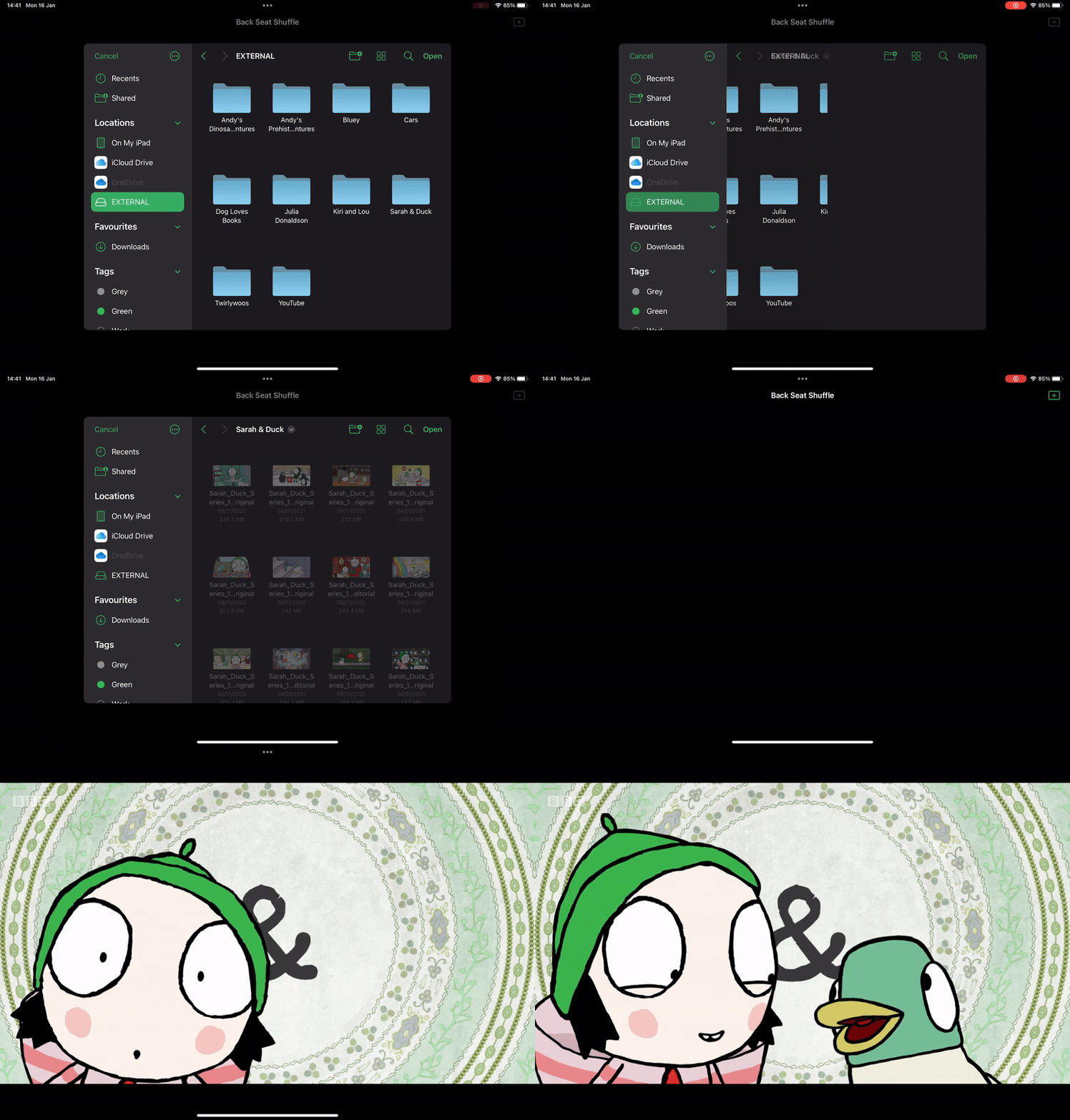
I had originally planned on reading the contents of the USB stick and using a single .jpg file in each directory to render a nice thumbnail. In the end I abandoned that as it would have meant building the whole interface when in fact it works perfectly well just using UIDocumentPickerViewController to pick the show I’m interested in:
Selecting a directory of videos in Back Seat Shuffle
In the end the only extra code I added was to strip out any files that were not in the .mp4 or .mkv format and to have it automatically return to the file selection screen once the full queue of randomised videos had finished.
Whilst I could potentially put it on the App Store, this is one of those weird edge cases that likely wouldn’t get through App Review as they’ll look at it and say “this is just the Files app” and completely miss the point. As this would be a free app, it’s not worth the hassle of doing screenshots, App Store description, etc, only to have it be rejected by App Review.
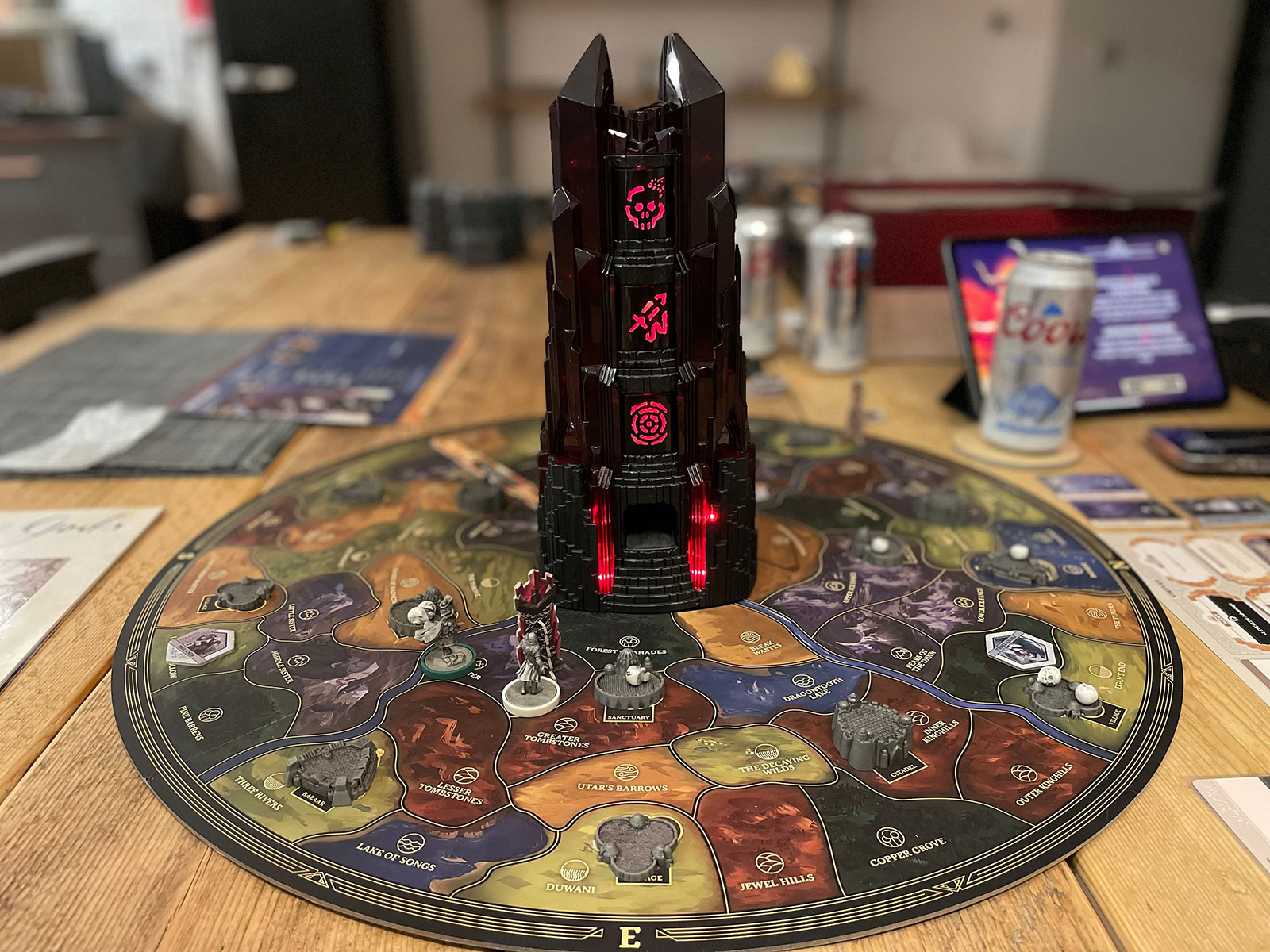
Return to Dark Tower is a really cool app-driven board game that comes with a physical tower that you connect via Bluetooth to an iPad. The tower lights up, makes sounds, and spins internally to shoot little skulls you place into it over the outlying map.
You put little skulls in the top of the tower to end your turn...
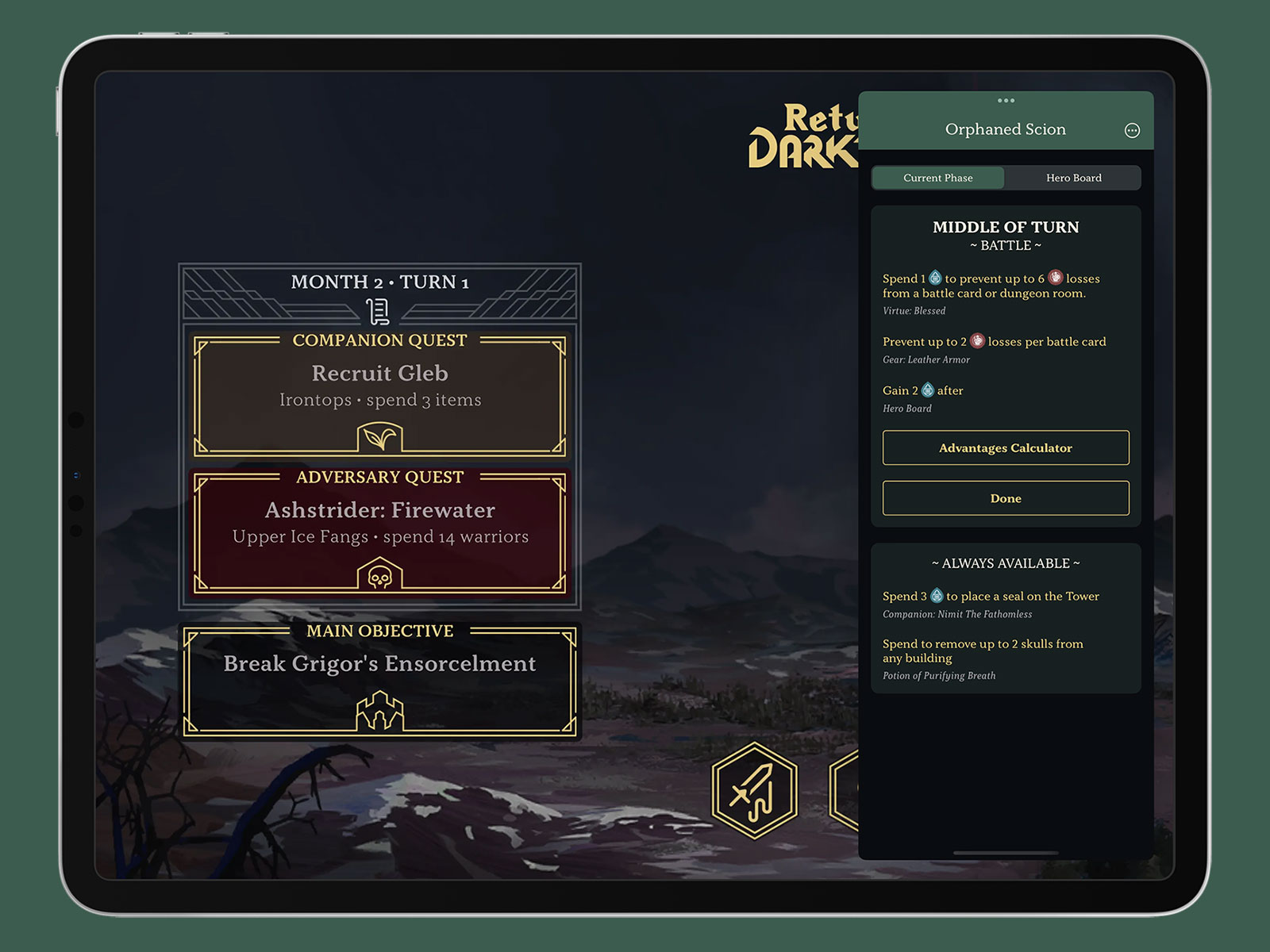
As much as I love it, there are a ton of cards in the game so you can easily forget what abilities you have available to you or miss crucial triggers at key phases in the game. You can also take most actions in any order so it’s easy to forget what you’ve done in the current turn, especially if you’re playing solo. To that end, I built myself a very niche app to keep track of all of the cards I had and all of the moves I’d made. It’s called Return to Dark Tower Assistant and is optimised for use in an iPad Slide Over panel so you can use it on top of the app you use to run the game:
Running the assistant in a Slide Over panel so you can still access the board game app beneath!
There’s a very slim chance that any of you reading this have a copy of this board game and even if you do it’s likely a small minority that would find utility in this app. That said, I think it demonstrates what I’ve said for over a decade about making apps for yourself; build things for yourself on the off-chance that somebody else finds it as useful as you do. I spent far too much time matching the colours to the player boards, getting the fonts just right, and doing things like perfectly embedding the right icons for warrior and spirit tokens but I did that because I want it to look good when I’m playing. It will likely only get single-digit downloads, but it’s an app I’m proud of.
The assistant is available now on the App Store. You can also read more about it on my Dodo Apps website.
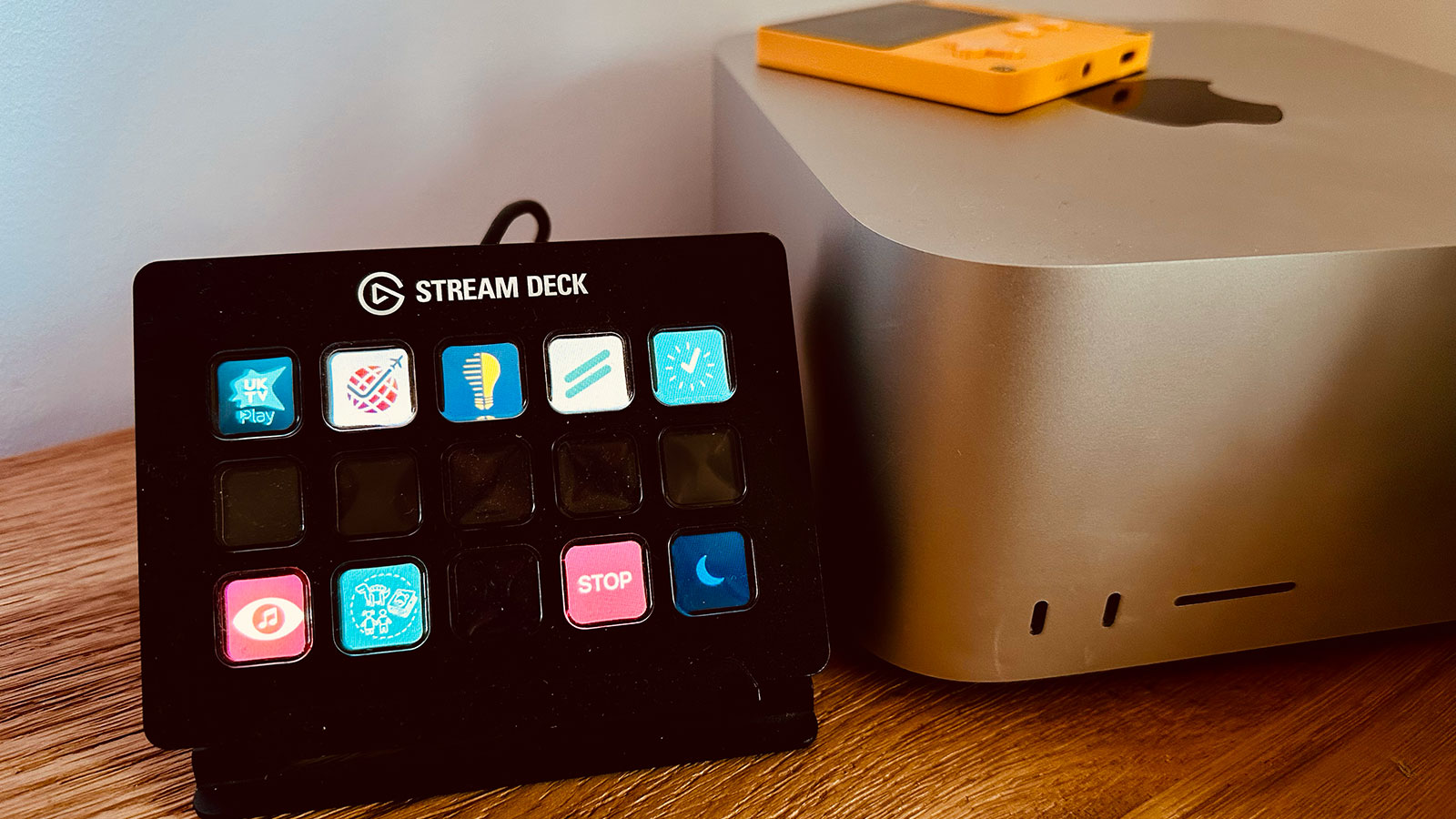
The Elgato Stream Deck is a fun device with 15 LED buttons that can be programmed to do whatever you want through an app that runs on PC and Mac. It was designed for streamers to be able to quickly switch scenes or present overlays but it has quickly become popular in other areas thanks to its flexible design. I picked one up in 2018 when I was dabbling with streaming but then mostly used it as control box for my Cessna 152 in Flight Simulator 2020 thanks to FlightDeck. I eventually replaced this with a bigger flight sim setup1 so the Stream Deck was sitting idle until I had the idea to integrate it into my app development workflow.
The Stream Deck running alongside my Mac Studio.
I typically work on multiple projects per day as I have a number of active client projects at any one time along with my own independent apps. This means I often waste time getting set up for each project so my initial idea was to have a single button press to get my workspace configured.
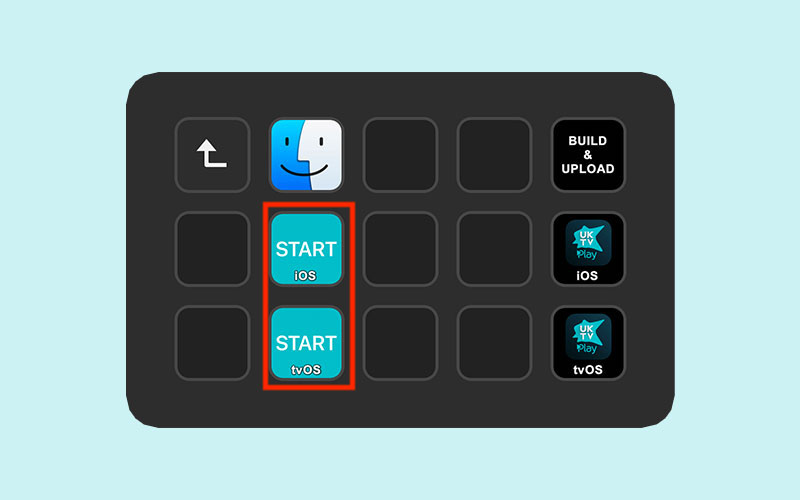
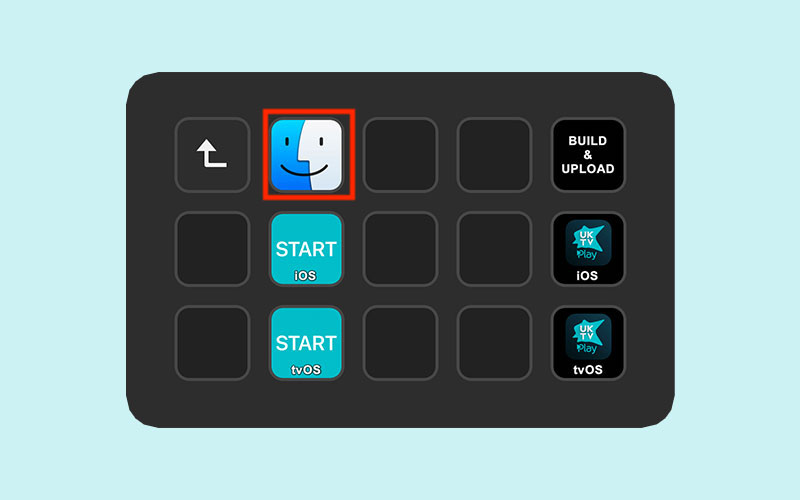
A single button per platform to start a project.
For example, I may want to start a specific Toggl timer, open a Jira board, and open the Xcode project. To do this, I created a single AppleScript file that is opened by the Stream Deck that will look something like this:
tellapplication"Timery"activatetellapplication"System Events"tokeystroke"1"usingcommanddownendtelldo shell script"open https://example.com/jira-board/"tellapplication"System Events"totellprocess"Safari"setfrontmosttotrueifmenuitem"Move to DELL P2415Q"ofmenu1ofmenubaritem"Window"ofmenubar1existsthenclickmenuitem"Move to DELL P2415Q"ofmenu1ofmenubaritem"Window"ofmenubar1endifsetvalueofattribute"AXFullScreen"ofwindow1totrueendtelldo shell script"open ~/Files/Clients/UKTV/iOS/App\\ Files/UKTV.xcodeproj"
In the first block I activate the Timery app and tell it to perform the keyboard shortcut ⌘+n where n is the project as it appears in Timery’s list. This will start a timer going for the project so I can track my time. I typically only use this for clients that I’m working with on a large project or have a regular maintenance contract with; for smaller ad hoc work I’ll instead throw an alert to remind me to start a timer manually.
The second block will open a URL in Safari to any website I might find relevant. This is typically a Jira or Trello board but can sometimes be to some API documentation, a GitHub issue pages, or even a local URL to open up a list in Things.
The third block is very specific to my hardware setup. I have an ultrawide monitor that I use as my primary display and then a 4K Dell monitor in portrait orientation to the side that I typically use for browsing and iOS simulators. This code tells Safari to move to that portrait monitor and then switch to full screen mode.
The final line opens up the Xcode project. I usually work in fullscreen mode on my primary monitor so it’ll typically move to a new space automatically without me needing to program that in.
With this simple script, I can press a single button to get everything configured. It’s probably only saving me 20 seconds of time but psychologically it lets me jump immediately into a project.
Opening a project directory.
Another minor hassle I encounter on a daily basis is opening up the directory where all of a project’s files are stored. I’ll typically do this if I need to look at some artwork I’ve saved or some documentation so I have a very simple script to open up the current project directory:
do shell script"open ~/Files/Clients/UKTV/"
This is again a psychological improvement as I hate wasting time digging down through Finder to get to the location I need.
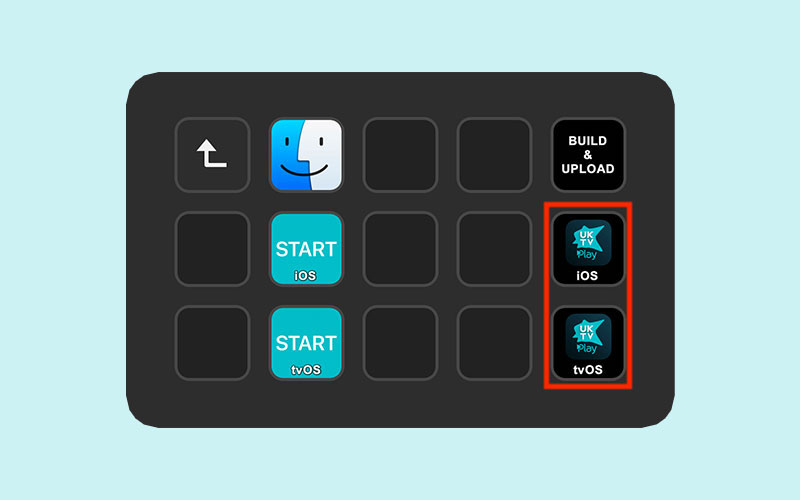
Building and exporting iOS / tvOS apps.
So far I’ve only made minor improvements to my productivity but this last button saves me a huge amount of time; automated building. Whilst many developers will handle this task with some form of Continuous Integration or using the new Xcode Cloud feature, this typically doesn’t work well for me due to the number of projects I’m involved with at any one time. Instead, I use Fastlane to perform a wide array of tasks at once such as increasing build numbers, pushing to GitHub, building, and uploading to TestFlight.
Here is a typical Fastfile2 for one of my client projects:
To start with I specify the Xcode version I want to use, the targets of the project, and the name of the remote git repository. I then import a Ruby file which I’ll come to shortly.
The only lane is distribute and the first check is to ensure the Git repository is clean. If there are any uncommitted changes, the script will exit out and present an error. I then select the correct version of Xcode3.
The next section includes a shared_increase_version() function which comes from the imported Ruby file:
### INCREASE_VERSION# # Prompts the user for a version number. If new provided, update all targets and reset# builder number to 1. Otherwise, just bump the build number.private_lane:shared_increase_versiondo|options|# Fetch all targets as comma-separated string and convert to arrayif!options[:targets]UI.user_error!("You must provide at least one target in 'targets'")endtargets=options[:targets].split(",")# Fetch current version using default Fastlane action with the first targetversion=get_version_number(target: targets.at(0))# Prompt for new marketing versionnew_version=UI.input("New marketing version? <press enter to keep it at v#{version}>")ifnew_version.strip==""# No change to version so just increase build numberincrement_build_number()else# Loop through each target and increment version number with "versioning" plugin# The native 'increment_version_number' action does not work with recent versions of Xcodetargets.eachdo|target|increment_version_number_in_plist(version_number: new_version,target: target)endversion=new_version# Set build number to 1 using default Fastlane action (shows a warning about ${SRCROOT} but it does work)ifoptions[:alwaysIncrementBuildNumber]increment_build_number()elseincrement_build_number(build_number: 1)endend# Fetch build numberbuild_number=get_build_number()# Write the new version number to the shared-tmp.txt file so calling lane can pick it up# This is a limitation of Fastlane not being able to return values in a shared laneversion_string="v"+version+"-b"+build_numberFile.write("shared-tmp.txt",version_string)# Message to the user to show the new version and build numberUI.success("App Version Updated: v"+version+" (build "+build_number+")")# If there is no git remote to push to, then exit the laneif!options[:push_to]||options[:push_to].strip==""UI.success("Skipping git")nextend# Commit the version changecommit_version_bump(message: "v"+version+" (build "+build_number+")",force: true)# Add a git tag in the format "builds/v1.1-b3"add_git_tag(includes_lane: false,prefix: "v"+version+"-b",build_number: build_number)# Push to specified remotegit_remote=options[:push_to].split("/",2)remote=git_remote[0]branch=git_remote[1]push_to_git_remote(remote: remote,remote_branch: branch)end
I won’t go through this line by line but the basic idea is that it will prompt me to ask whether this is a new version of the app or a new build; if the former, the version is updated to the one specified and the build number set to 1 across all targets; if the latter, then I just bump the build number. Once that is done, a version string is created that looks something like v1.2.3-b2 which I will use later in the workflow; this string is saved to a temporary file so the original Fastfile can reference it.
With the version and build number updated, the script then commits the changes to Git, tags them, and pushes them to the remote branch if one was specified.
The code resumes in the Fastfile with an Xcode build command (which stores the build and it’s dSYMs in a local directory), an upload to TestFlight, and the uploading of the dSYMs to the Crashlytics service.
With this system in place, I can press one button to have the entire build process execute in the background. This is hugely important to me as I can start work on another project whilst this process plays out; on the Mac Studio I don’t even notice anything is happening as the build process doesn’t come close to maxing out the CPU.
The nice thing about this Fastlane system is that I can make it bespoke for projects that need something a little different. Here, for example, is the file for a Catalyst project I work on:
# Configxcode_version="14.1.0"targets=["ATPDigital7"]git_remote="origin/master"# Import shared Fastfileimport"~/Files/Scripts/SharedFastfile.rb"### LANES##lane:distributedoxcode_select("/Applications/Xcode-"+xcode_version+".app")ensure_git_status_clean()shared_increase_version(targets: targets.join(","),push_to: git_remote,alwaysIncrementBuildNumber: true)system("git push helastel HEAD:develop")version=File.read("shared-tmp.txt")UI.important(version)ios_export="ios-"+versionmac_export="mac-"+version# Build the macOS appbuild_app(catalyst_platform: "macos",output_directory: "builds",output_name: mac_export)# Rename the macOS app export to mac-v1.0-b1.appFileUtils.mv("../builds/ATPdigital 8.app","../builds/"+mac_export+".app")# Zip the macOS app and then upload it to S3zip(path: "builds/"+mac_export+".app",output_path: "builds/"+mac_export+".zip")s3_upload(access_key_id: "IMNOTTHATSILLY",secret_access_key: "Uhuhuhyoudidntsaythemagicword",bucket: "bucketname",content_path: "builds/"+mac_export+".zip",name: "clients/bgs/builds/"+mac_export+".zip")# Build the iOS appbuild_app(catalyst_platform: "ios",output_directory: "builds",output_name: ios_export)upload_symbols_to_crashlytics(dsym_path: "builds/"+mac_export+".app.dSYM.zip",binary_path: 'scripts/upload-symbols')upload_symbols_to_crashlytics(dsym_path: "builds/"+ios_export+".app.dSYM.zip",binary_path: 'scripts/upload-symbols')# Upload macOS app to TestFlightupload_to_testflight(pkg: "builds/"+mac_export+".pkg",skip_submission: true,skip_waiting_for_build_processing: true,app_platform: "osx")# Upload iOS app to TestFlightupload_to_testflight(ipa: "builds/"+ios_export+".ipa",skip_submission: true,skip_waiting_for_build_processing: true,)end
This one is a lot more involved but the basic steps are very similar:
Set up the configuration that is needed
Select Xcode, check the repo is clean, and bump the version number
Do another Git push to a different repo
Build the macOS version of the app, zip it, and upload it to an Amazon S3 instance
Build the iOS version of the app
Upload the dSYMs to Crashlytics for both versions
Upload each version to TestFlight
The process typically takes about 20 minutes to run but would take longer if I were doing it manually as there are multiple points that would require user interaction. That I can press one button and have this run seamlessly in the background is of huge benefit to me, especially if I’m doing multiple builds in a single day.
I also have a client that has 6 apps that all come from the same codebase. Again, I can press one button and have all 6 of those apps compiled and uploaded; it also automatically submits each app to the App Store once the builds have finished processing!
I’m planning on extending this further in the future as I create a HTML page for some clients which gives a changelog for each build based on the commit messages. At the moment I do this manually but I could easily automate that with AppleScript and hook it into this process.
My Stream Deck homescreen
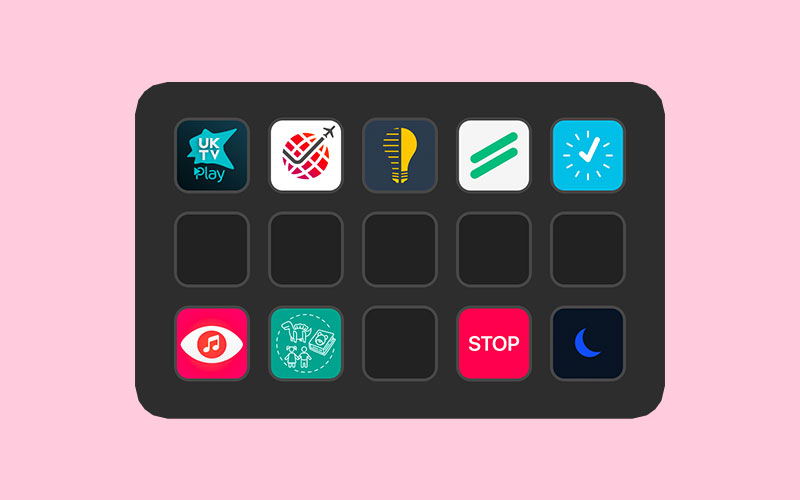
The final thing to mention is the Stream Deck homescreen itself. I have a folder for each project denoted by their app icon which then goes into the start / build commands detailed above. There is also a STOP button will stop any Toggl timer that is currently running and a sleep button that will turn off the Stream Deck display.
I have been incredibly impressed with the Stream Deck as an input device and think it can be an incredibly valuable tool for any app developer that works on multiple projects. All of the above can be achieved by just running an AppleScript file (as that is what the Stream Deck is doing) but I find the tactile nature of the device to be incredibly rewarding and I know there is a ton more I’m going to do with it over time.
The Bravo Throttle Quadrant has physical buttons on it for dealing with auto pilot settings and flaps which were my main use cases with FlightDeck. ↩︎
All of the magic works in the Fastfile but the Stream Deck still needs to be able to start the command so I use an AppleScript to open Terminal and kick off fastlane distribute in the correct directory. ↩︎
I have 3-4 versions of Xcode installed at any one time as different clients will be on different release schedules so I may still need to build something with an older version. I’ll likely change this portion of the script to always use the latest version unless I manually specify one as it’s a pain to edit my script files whenever a new Xcode update comes out. ↩︎
For the past few months I’ve been meaning to start a newsletter; partially as a way of motivating me to finish some of my many projects, partially as a way of building up a mailing list so I can market my own apps better. The priority for this has only increased as the long-term future for Twitter (my main source of referrals to my various apps and websites) has moved to shakier ground1.
I’ve created an initial introductory post going through some of the motivations for this move and listing some of the items on my “To do” list but the aim is to produce a new issue every 2 weeks.
I like to use my main website for either announcing new releases or providing code-level tutorials; the newsletter will be slightly different in that it will be showcasing things way before they are necessarily ready for prime time. This has two main benefits in that working akin to a 2-week sprint cycle will hopefully motivate me to proceed with the numerous app ideas that are half-finished on my hard drive; on the flip side, it will also hopefully generate some much needed feedback during the development process as I’m planning to invite subscribers to early access betas of new apps and major updates to existing apps. This all begins next week when I’ll be going into detail with the Music Library Tracker upgrade that introduces Spatial Audio matching as well as showing off a new dice-based game mechanic I’ve created for a “Choose your own Adventure” style game.
As we head into 2023 I’m determined to try and spend more of my time on my independent projects. By subscribing to the newsletter, you’ll be directly boosting my motivation towards that aim and hopefully getting an insight into how a developer forms an idea into a digital reality.
I’ll be landing in your inbox for the first issue next week!
I don’t necessarily share the pessimism of others with regards to Twitter’s future but there is a non-zero chance that it shuts down without warning one night in the near future so best to be prepared. I won’t be moving to any other social media network. ↩︎
I can’t remember if I’ve mentioned my affinity for dodos on this blog before but the reason for the name comes from two things: my surname contains the same letters as “dodo” and when I was at school I loved the dodo character in Disney’s Alice in Wonderland (“you there, stop kicking that mackeral”). When I developed my first piece of software, a database system for the management of choral robes (honestly), I used “Dodo Apps” as the name and it’s kind of stuck! ↩︎
A little while ago, my chiropractor recommended that I take up the “Couch to 5K” program in order to improve my fitness in a way that wouldn’t see me literally running before I could walk. It was a huge success and I was able to lose a significant amount of weight and improve my overall health. Unfortunately, the 2020 lockdowns and the birth of a new child meant most of that effort was undone and I found myself once again needing to embark on a gradual increase in exercise.
One of the key features of Couch to 5K is that you do intermittent bursts of running and walking; for example, in the first week you’ll do three runs consisting of alternating 60 seconds of running (x8) and 90 seconds of walking (x7) sandwiched between a 5 minute warm up and cool down. To keep track of this, I used the free NHS Couch to 5K app which tells you what to do at each stage via an audio voiceover which also offers encouragement throughout your run. This worked well for me as I listened to music whilst doing my runs, but nowadays I prefer to run whilst watching TV shows or YouTube videos on an Apple TV in front of my treadmill. For this use case, audio interruption wasn’t necessarily what I wanted, especially as I was already vaguely familiar with the different run timings. Instead, I wanted an app on my Apple TV that could show me my run progress in a Picture in Picture window.
The idea is straightforward enough; you open the app to a grid showing all of the available runs1 and then navigate to a fullscreen running page with a timer and coloured blocks that show what you should be doing. This can then be shrunk down into a Picture in Picture window so you can see the critical information whilst you watch something else.
Originally I’d planned to use the new AVPictureInPictureController.init(contentSource:) API that was introduced with tvOS 15.0 as that would allow me to fairly easily render the UIView of the run screen into the PiP window; unfortunately, there is a bug with tvOS which prevents that from working and is still present in the tvOS 16 betas.
My next plan was to have the app render a video of the run on the fly. Essentially I would display the running UI, snapshot it with UIView.drawHierarchy(in rect: CGRect, afterScreenUpdates afterUpdates: Bool), and then pipe the UIImage into an AVAssetWriter at 1 second intervals to generate a video. Unfortunately that proved too intensive for the Apple TV hardware (especially the non-4K model) with the render taking a couple of minutes for each video. However, as I’d already built the render pipeline, I instead updated the system to generate all of the videos sequentially and store them; I then ran that in the tvOS Simulator to generate the 12 videos2 and then bundled them in the app. Much easier 🤣
The final part was to add a button to the top of the run selector page that would show you your next run. To do this, I store the week and number of the last run that was completed3 within NSUbiquitousKeyValueStore; this is a similar API to UserDefaults with the advantage that it is synced through the user’s iCloud account meaning it’ll survive reinstallations or switching to a new Apple TV without restoring from backup.
However, that led to an interesting idea. Could I port this to other platforms? And if I could, would I be able to do it in a single day?
Yes.
Despite using UIKit rather than SwiftUI, I was able to port everything over to iPhone, iPad, and Mac within 5 hours or so. I started by rejigging the project files so shared code would be separate from the xib files I use for the interface. I then added a new target for iOS and went through the laborious process of recreating the xib files; unfortunately tvOS and iOS xibs are incompatible even so far as you can’t copy and paste standard elements like UILabel between them.
The design was such that it was quite easy to make it work for iPhone. The run page itself just needed some font size adjustments whilst the grid view showing all of the runs had some stack views tweaked so they were shown vertically rather than horizontally.
The next step was to optimise the design for iPad. Again, this mostly worked out of the box as I use AutoLayout for everything. I just needed to monitor trait changes and update the code to render slightly differently depending on whether we were in compact or regular width mode. This had the nice side effect of enabling the three column layout on an iPhone 13 Pro Max in landscape and also working across the various split screen views that are available on iPad.
Finally, I checked the box for Catalyst support for macOS and was surprised to find that everything pretty much worked out of the box. I only needed to add the following code to get the app looking just fine on the Mac:
That code effectively hides the toolbar so the traffic light window management buttons blend into the app view and then restricting the minimum view size to that of a regular iPad so you can’t break the layout4.
With that done, I then went through the app and added a few quality of life improvements such as a native menu bar on the Mac, keyboard shortcuts for Mac and iPad, and adding the ability for PiP to automatically engage when you leave the app during a run on iPhone and iPad.
SwiftUI would undoubtedly have made the UI faster to port, but I still think the platform is too immature for full app development. As Richard Turton put it:
SwiftUI allows you to move so incredibly fast that by the time you realise what you want isn’t yet possible, you’re already off the edge of the cliff, like Wile E Coyote
That certainly matches my experience 🤣. Whilst it can be a phenomenally quick tool for building UI, it can’t quite match the smooth experience that users expect when it comes to the small but crucial details.
In Conclusion
As I’ve said many times before, one of the great joys of being a software developer is that you can build apps bespoke for your own needs and interests. I’ve massively enjoyed having Chaise Longue to 5K on my Apple TV whilst doing my runs, but I also really enjoyed the challenge of porting the app across to all the other Apple platforms that support Picture in Picture5. As ever, there are a number of small details that I’d like to highlight:
Whilst adding extra platforms didn’t take that long from a development point of view, it massively increased the amount of time preparing for App Store submission as I had to create a lot more screenshots, text, etc. Trying to work out the best way to show PiP on macOS was an interesting challenge! It was also difficult to work out a way to show it on tvOS without using copyrighted video content.
A nice side effect of using the same bundle identifier for all three versions of the app (Apple TV, iOS/iPadOS, Mac) is that if you buy it on one platform you get it on all of them! As I’m selling it for £1.79 currently, that makes it a pretty sweet deal…
I spent quite a lot of time on a little animation effect that happens when you first complete a 5K run. Confetti in front of and behind a real time blur that animates seamlessly. Beautiful.
I’m really pleased with how the Apple TV app icon came out as I’m always a big fan of the parallax effects you can create. I found a very cheap designer on Fiverr who created a first pass and then I tweaked it to match my needs; I can’t draw to save my life but I can recompose and recolor objects pretty well!
I was amazed that all of the Picture in Picture stuff just worked across all the platforms; I didn’t have to change any code whatsoever and whilst the videos were rendered from the tvOS app UI they look good on all platforms.
Thanks to using NSUbiquitousKeyValueStore coupled with .didChangeExternallyNotification, completing a run on one device will see the UI automatically update on all other devices within seconds. No 3rd party frameworks or private data collection required!
I’d love it if you would give Chaise Longue to 5K a try. It’s available now on tvOS 14 and above, iOS / iPadOS 14 and above, and macOS Big Sur (11.0) and above. One low price unlocks it across all platforms.
Even though there are 27 runs, that only equates to 12 videos as most weeks the three runs are identical so they can use the same video. Generating those on my M1 Ultra Mac Studio took less than 3 minutes and means I can easily update them should I want to update the UI in future. Each video is rendered at 720p and weighs in at around 3mb leaving the overall app size at under 40mb. ↩︎
Which is defined as getting to the cool down section. ↩︎
Views in Catalyst always seem to be of the “Regular / Regular” size regardless of what tiny windows you create so it isn’t possible to have the view seamlessly change between iPad and iPhone style sizes when resizing hence the need for a sensible minimum size. ↩︎
I did not bother porting the app to Apple Watch as there are loads of Couch to 5K apps that will serve you better on that platform; this app is predominantly about the Picture in Picture experience. ↩︎